Custom React Hook to cancel network calls and synchronize APIs with component life cycle

Akashdeep Patra8 Sept, 2022



The Problem
Before we start, let's talk about the problem we're trying to solve here. If you're working with React, it's almost impossible that you never saw this error log in your browser console.
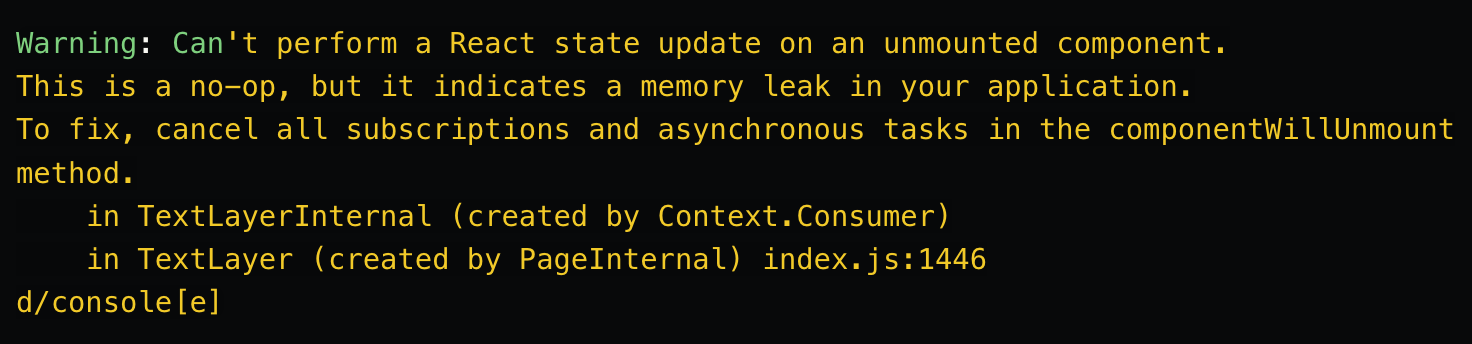
It is probably one of the most painful things to get your head around after you have gained a good understanding of how the component lifecycle works. This error basically means you are using an asynchronous block of code that has some state mutation inside it (By state mutation, I mean setState) thus resulting in a memory leak.
Although, in most cases, it's harmless, there's still a possibility of unoptimized heap usage, chances of your code breaking, and all the other good stuff that goes around with it.
The Solutions
There are a couple of ways we can tackle this problem. One of the most popular solutions is to use any logic that checks if the component is still mounted in the component tree and make any state change operation only then you can think that would solve your problems, right? Let's take a step back and think about a very famous hook useIsMounted.
Now think about a scene where you are making an API call on the mount of a component, and using this hook, you'll change the state only if it's still mounted.
1 2 3 4 5 6 7 8 9 10 11 12 13 14const isMounted = useIsMounted(); const [value, setValue] = useState(); useEffect(() => { fetch('some resource url') .then((data) => { return data.json(); }) .then((data) => { if (isMounted()) { setValue(data); } }); }, [input]);
Looks like a perfectly okay piece of code that totally doesn't throw any errors, right? Well, in a way, this works.
But
- Aren't you still making the fetch call?
- Aren't you still fulfilling the promise? What you don't need to do if the component is already unmounted right?
And depending on how API-driven your application is, avoiding to fulfill all the network requests might benefit you in ways that you never considered. So how can we do that? We can cancel the ongoing request and as it turns out, modern browsers have had this feature for quite some time.
The AbortController Interface allows you to abort any web request. As of now browser's fetch API and Axios officially support AbortControllers. Now we can just be done with this here, but just to make it look a little bit cooler, let's make a custom hook out of this and look at a live example.
useAbortedEffect hook to cancel any network requests when the component unmounts
1 2 3 4 5 6 7 8 9 10 11 12 13 14 15 16 17 18 19 20 21import { useEffect } from 'react'; const useAbortedEffect = ( effect: (signal: AbortSignal) => Function | void, dependencies: Array<any> ) => { useEffect(() => { const abortController = new AbortController(); const signal = abortController.signal; const cleanupEffect = effect(signal); return () => { if (cleanupEffect) { cleanupEffect(); } abortController.abort(); }; }, [...dependencies]); }; export default useAbortedEffect;
Now let's break things down to understand what's going on. Our custom effect takes the callback function that accepts an AbortSignal param, and a dependency array as an argument just like any other effect hook, inside our useEffect we instantiate an AbortController and pass the signal into our effect callback so that any network request we want to make should be able to get this signal. This would help us to control the execution cycle of all the APIs that will be declared in our effect callback. And in the unmount callback of our useEffect we just abort the controller and any network call that is going on in our effect will be canceled from the browser.
Let's take an example to appreciate this hook
In this example, we'll be creating three nested routes using React router's Outlet API to make each page mount and re-mount consecutively so that we can monitor the network tab.
1 2 3 4 5 6 7 8 9 10 11 12 13 14 15 16 17 18import { Outlet, useNavigate } from 'react-router-dom'; const Home = () => { const navigate = useNavigate(); return ( <div> Home Page <div className="column"> <button onClick={() => navigate('/first')}>First</button> <button onClick={() => navigate('/second')}>Second</button> <button onClick={() => navigate('/third')}>Third</button> <Outlet /> </div> </div> ); }; export default Home;
In each of our pages first, second, and third we will use our custom hook to fire an API and pass the signal argument to the signal properties of fetch and Axios to control the request (remember this step is mandatory because any request that doesn't have this signal would not be canceled).
The First-page component would look something like this -
1 2 3 4 5 6 7 8 9 10 11 12 13 14 15 16 17 18 19 20 21 22 23 24 25 26 27 28 29 30 31 32 33//example with axios useAbortedEffect( (signal) => { axios .get('https://jsonplaceholder.typicode.com/posts', { signal }) .then((data) => { console.log('First API call'); }) .catch((e: any) => { if (e.name === 'CanceledError') { console.log('First API aborted'); } }); }, [] ); return ( <div> First Page <div style={{ display: 'flex', gap: '10px', marginTop: '20px' }}> <button onClick={() => setCount(count + 1)}>Click </button> <span>Count : {count}</span> </div> </div> );
Now since I'm using a JSON placeholder as an endpoint suffice to say noticing any pending state of the network call would be tricky so let's simulate a slower network. In the dev-tool open up the network tab and select Slow 3G from the networks dropdown (I'm using Chrome).
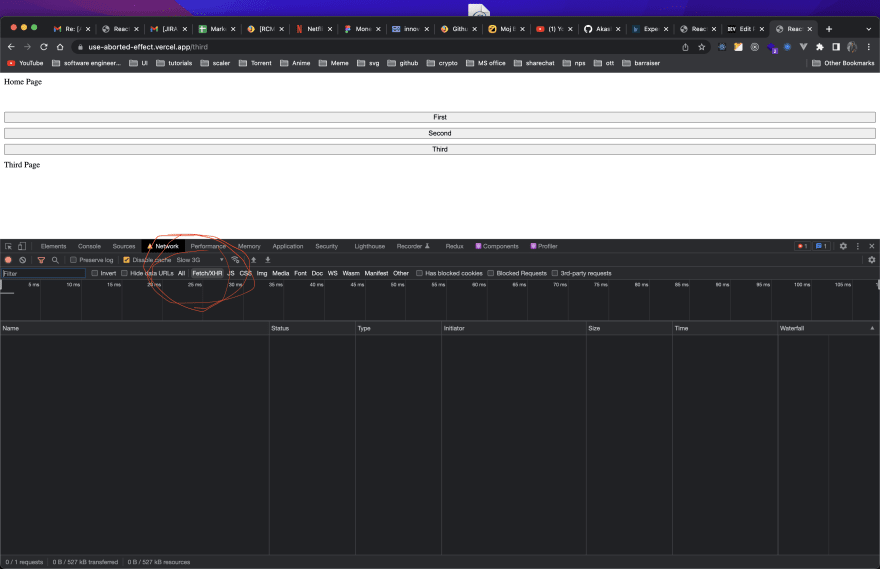
Now after starting the application start clicking on the First, Second & third link in the exact order and look at the network tab -

and since we had used console.log at each step in our custom effect let's look at the console too -

As you can see after consecutively mounting and remounting the First and Second pages, all the pending requests got canceled because of the Abort signal and we can see the exact console logs as well. This would work similarly to debouncing in javascript but instead of debouncing with timers during the event loop, we'll be debouncing network requests in the browser itself.
What can you achieve with this hook?
Depending on how you have architected your application and how much API-driven it is, potentially you could -
- Avoid memory leaks in the components.
- Make Atomic API transactions with respect to your Component.
- Make less number of API calls altogether.
We are hiring!
At ShareChat, we believe in keeping our Bharat users entertained in their language of preference. We are revolutionizing how India consumes content and the best in class Engineering technology is at the forefront of this transformation. In addition, you'll also get the opportunity to work on some of the most complex problems at scale while creating an impact on the broader content creation ecosystem.