Elastic Spark: Autoscaling Structured Streaming at Sharechat

Subham Singhal1 Sept, 2025



Background:
At ShareChat — a leading social media platform with over 200M monthly active users (MAU) — our data platform ingests and processes more than 1 million events per second. However, this event load isn't constant. We observe significant traffic fluctuations throughout the day, with peak loads between 6 PM and 11 PM, and minimal activity during off-peak hours like 12 AM to 6 AM.
Running spark streaming workloads with a fixed number of executors leads to inefficient resource utilization — we are either over-provisioned during low-traffic periods or under-provisioned during peak times. This results in unnecessary infrastructure costs or performance degradation.
To address this challenge, we developed a Spark Streaming Autoscaler that dynamically adjusts resources based on real-time traffic and processing demands.
Nature of our spark Job:
- High volume of events
- Stateless in nature, we don’t maintain any state
- Varying traffic across time
Dynamic Resource allocation in Spark:
Spark has the concept of DRA which can be used to autoscale spark jobs but this is mainly used for batch jobs and not suitable for micro batch execution. More details about this can be found here
Scheduled scaling:
Having ruled out DRA, we resorted to scheduled scaling. Our traffic pattern is sinusoidal in nature.
Traffic pattern:
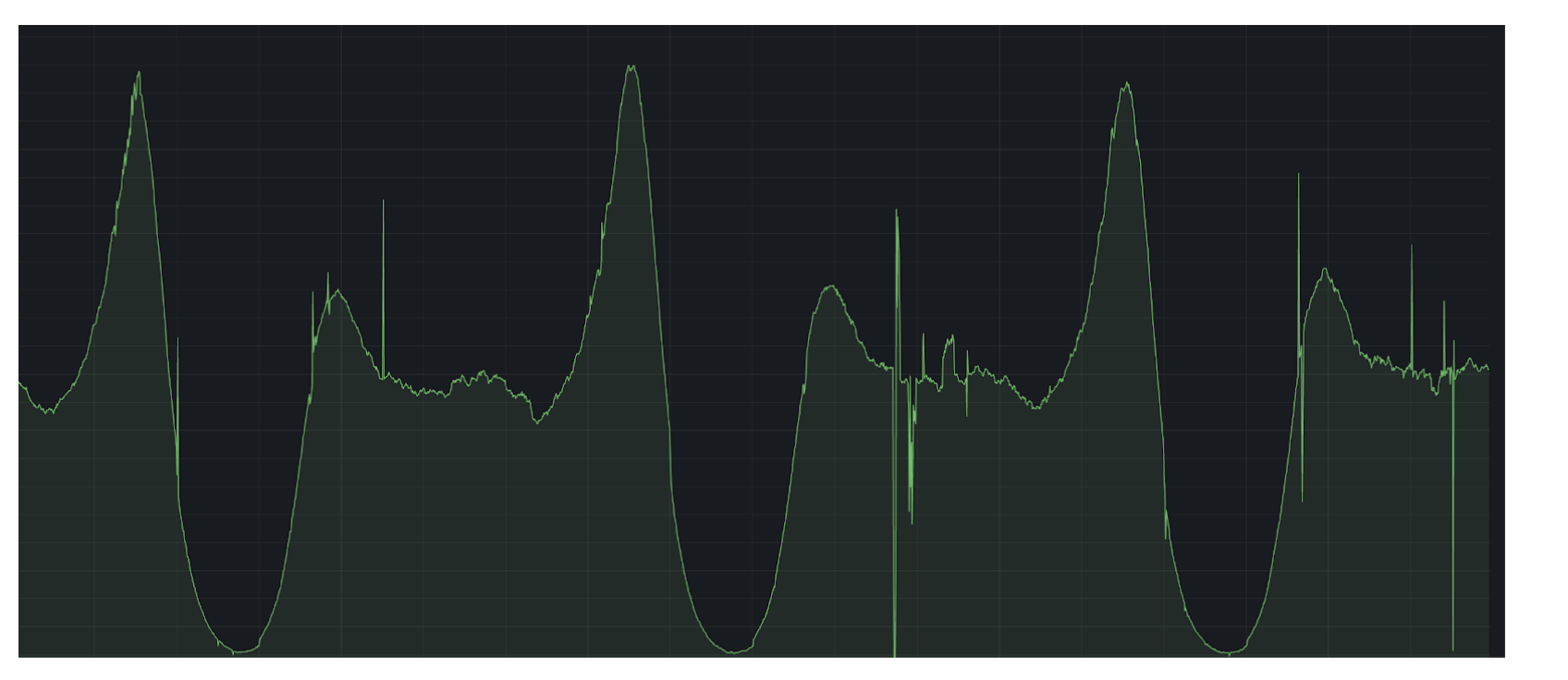
Knowing traffic patterns we divided time into 4 quadrants. 12AM-6AM, 6AM-12PM, 12PM-6PM, 6PM-12AM and set appropriate worker counts for each time period based on peak traffic. Every 6 hours we would restart streaming jobs and start with appropriate worker count.
This served as a decent solution for us, but could not scale automatically if there was some sudden surge in traffic and needed manual intervention.
Spark Streaming autoscaler:
Autoscaling spark executors:
We took inspiration from PR and gave it a shot on our own. We configured lower bound and upper bound for micro-batch execution and scale up or down if n consecutive micro-batch cross a defined threshold.
if micro-batch execution < LOWER_THRESHOLD for n consecutive micro-batch -> reduce worker
if micro-batch execution > UPPER_THRESHOLD for n consecutive micro-batch -> increase worker
Spark provides a utility function to increase/decrease worker count
spark.sparkContext.requestExecutors(1)
spark.sparkContext.killExecutor(execId)
killExecutor function needs executor id, for this we extended SparkListener class to get onExecuterAdded and onExecutorRemoved events to keep track of running executors and removed one of them during downscaling. We can apply custom downscaling logic here — e.g., based on task count per executor or number of RDD blocks — instead of randomly choosing an executor.
Finally we hooked the autoscaler class with spark micro-batch execution. For this we extended StreamingQueryListener and during each micro-batch execution called autoscaler to evaluate autoscaling policy.
What’s left is tuning the lower and upper threshold based on jobs. This can vary per job and requirement. One can decide to scale up fast and scale down slow or other policy based on requirement.
Autoscaling K8 cluster:
We have successfully applied the autoscaler to our spark streaming job, but what about scaling the underlying kubernetes cluster. We are running spark on GKE which internally uses the kubernetes cluster to deploy spark jobs.
We are using Cast.ai to automatically resize our node pool and efficiently bin pack executors in k8 nodes. Cast.ai automatically scales up/down kubernetes cluster based on compute requirements.
Autoscaling spark partitions:
In spark, partitions are the fundamental units of parallelism. If we scale up executors (and hence cores) without increasing the number of partitions, we won’t fully utilize the available compute leading to wasted resources without any real gain in performance.
Worse still, spark’s autoscaler may continue adding executors under the assumption that the job is under-provisioned, when in reality, the issue lies in insufficient partitioning. To truly benefit from autoscaling, we must ensure that we have enough partitions to keep all available cores busy.
The Kafka Partition Constraint:
In Spark Structured Streaming, there's a 1:1 mapping between kafka partitions and spark partitions. If a kafka topic has 10 partitions, spark will create 10 corresponding input partitions. These are the units spark uses to process data in parallel. While spark provides the minPartitions option to create more spark partitions than kafka partitions, this value is static and can’t be changed at runtime.
As a result, if traffic increases, spark doesn’t increase the number of partitions dynamically, creating a bottleneck during peak load conditions.
Our Solution: Dynamic Partition Scaling:
To address this, we contributed a PR to apache spark that allows dynamic partitioning based on input volume. This enhancement introduces a mechanism where users can specify the maximum number of records per partition. Spark will then automatically split the workload into more partitions when traffic increases — ensuring better core utilization and runtime efficiency.
This makes partitioning adaptive to traffic, solving the problem of static partition counts during autoscaling.
Alternative: High Static minPartitions:
Another approach is to set a high minPartitions value upfront. This ensures enough partitions to support parallelism even at high scale. However, this leads to many small partitions during low traffic periods, increasing scheduling overhead and potentially degrading performance.
Result:
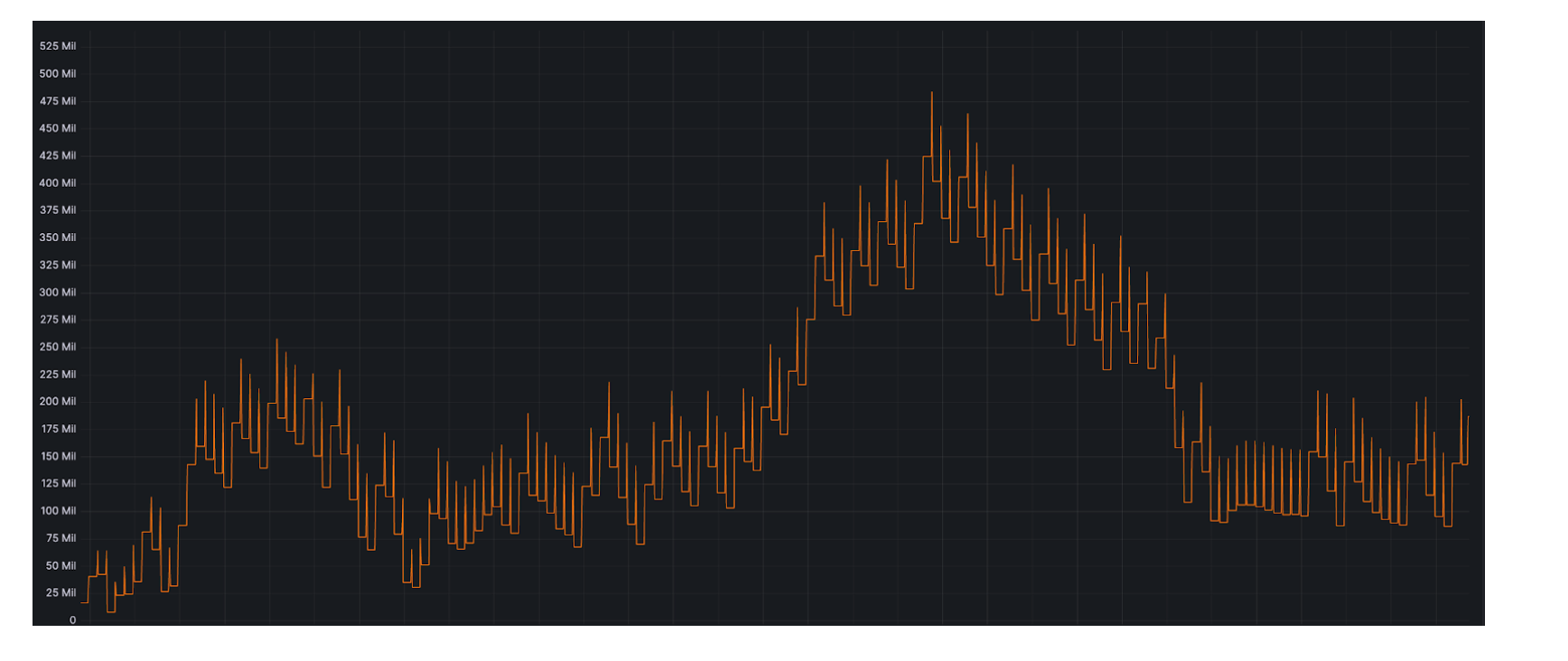
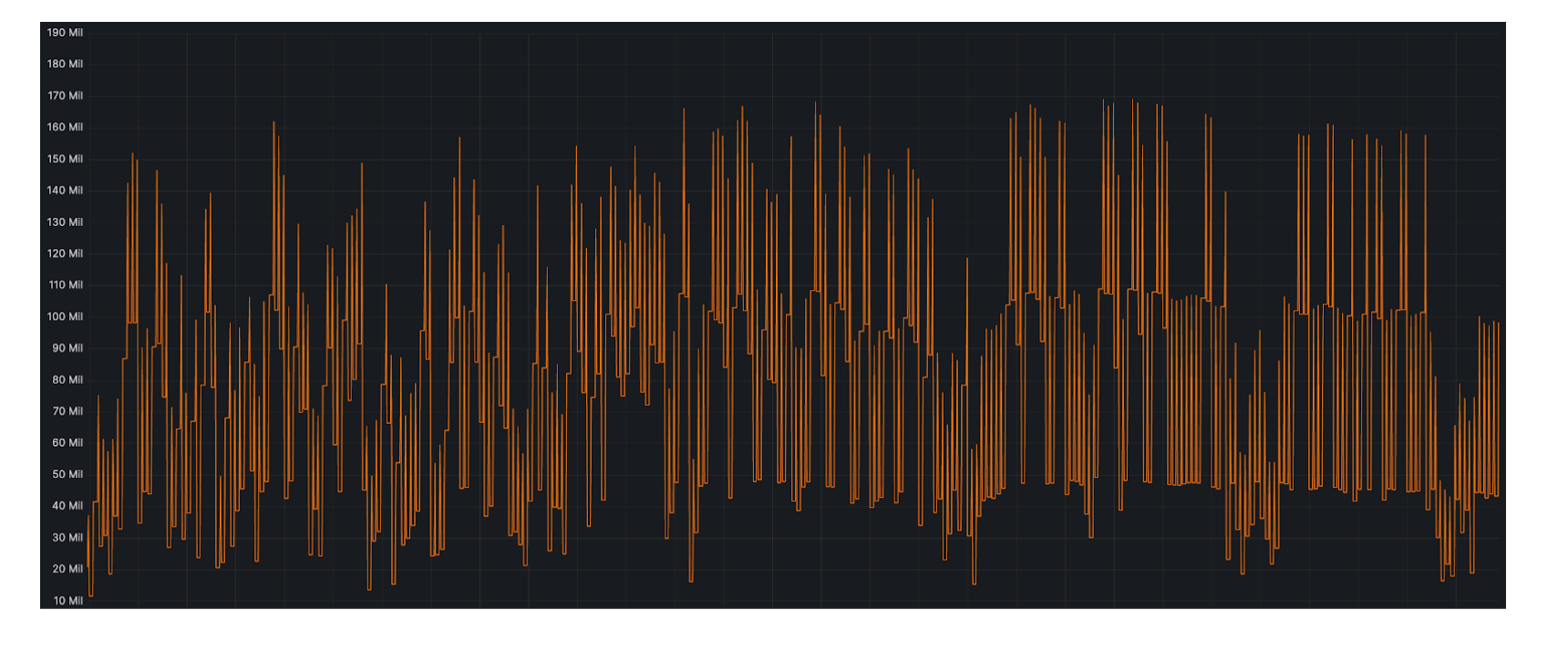
This is the difference in topic lag at peak time before and after applying autoscaling.
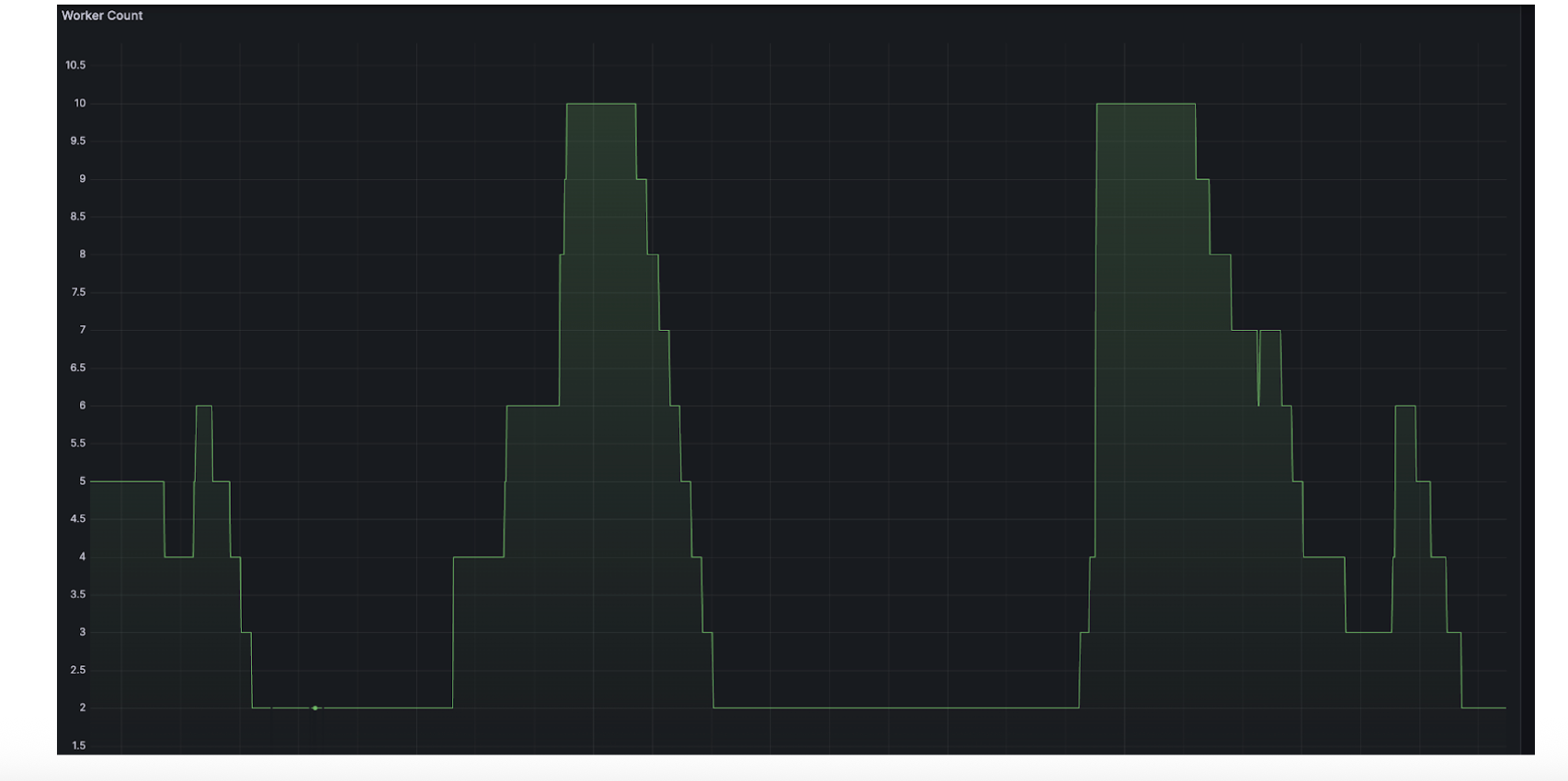
Worker count graph which shows executors are dynamically getting added/removed based on traffic:
Concluding Remarks
Our autoscaler has allowed us to run Spark Structured Streaming jobs that adapt in real time — reducing operational overhead and optimizing both performance and cost. While we currently use micro-batch duration as the core metric, the framework is extensible and can incorporate Kafka lag, throughput, or custom business KPIs for even smarter scaling.