Enhancing Service Stability through Signadot Sandbox with Automated Integration Testing

Mahesh Uligade27 Sept, 2023



Written by Mahesh Uligade
At ShareChat, we have experienced tremendous growth in recent years. However, this rapid scaling has significantly increased the complexity of our code releases. To give you some context, our organisation runs hundreds of services and jobs using a variety of programming languages, such as JavaScript, TypeScript, Java, and Go. We also use a diverse range of data stores in our tech stack.
As our cluster grew more complex, we struggled to develop and test in an environment closely mimicking production. This cannot be emphasized enough: if a release behaves differently in production than in staging, it can require extensive rollbacks. Rectifying a recent update would significantly slow down our developers.
The testing before testing: space for experimentation
When we talk about 'testing,' we often think of automated testing. However, another crucial aspect of testing is the ability to perform manual tests before merging feature branches. Terminology can vary in this context; this phase can be referred to as 'acceptance testing,' 'developer testing,' 'manual testing,' or using a 'preview environment.' Whatever the term used, it signifies the stage where our developers observe their code working in a realistic environment. This stage is relatively straightforward when dealing with a monolithic application that can run on a laptop or when the team is small. However, it becomes considerably more challenging to facilitate in the context of a sizable microservice architecture and when the team size is large.
One key advantage of a staging environment is its role as a safety net for detecting and addressing bugs before they reach the production environment. Staging deployments are valuable for pinpointing problems associated with dependencies and integrations.
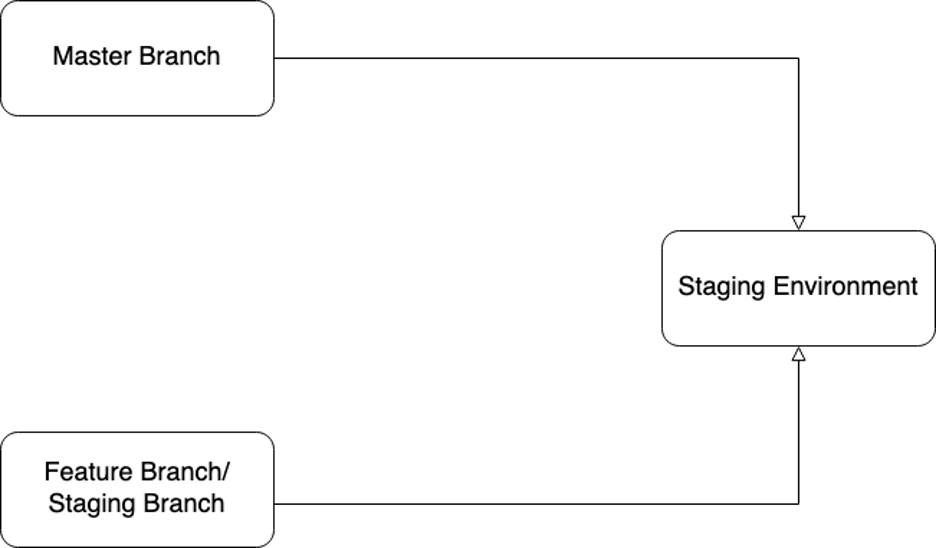
Figure 1: Multiple branches developing on the staging environment
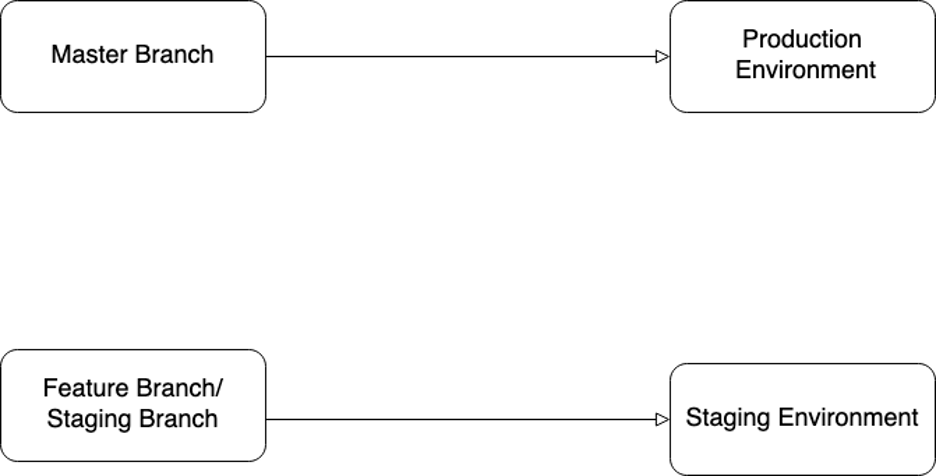
Figure 2: Staging environment and production environment with different branches as sources of truth
Few teams in the organization followed the Figure 1 architecture for their staging environments, while others opted for the Figure 2 architecture. In the first scenario, multiple branches were employed for staging environment deployments, potentially leading to disruptions when a developer introduced breaking changes from a feature branch into the staging environment. On the other hand, in the second scenario, various branches were deployed to different environments, resulting in the issue of divergent branches, as illustrated in Figure 3.

Figure 3: Diverged branches of staging
When merging feature branches into this diverged stage branch, developers frequently encountered numerous merge conflicts, resulting in an additional 30 to 40 minutes of effort. The author created two pull requests in this process—one against the staging branch and another against the master branch. Reviewers were then required to evaluate two pull requests for a single change. If something were inadvertently merged into one service stage branch, causing that service to crash, it would block the work of other dependent QA teams and developers.
Furthermore, this implies that what is deployed in the production environment for the underlying service differs significantly from what is deployed in the underlying service in the staging environment. This discrepancy is evident in Figure 4 and Figure 5, where Service 2 provides Response 1 on staging but Response 2 on production. This disparity was the root cause for the feature exhibiting different behavior in the production environment compared to testing after deployment. It wasted many working hours and team efforts to identify such issues and perform maintenance work."
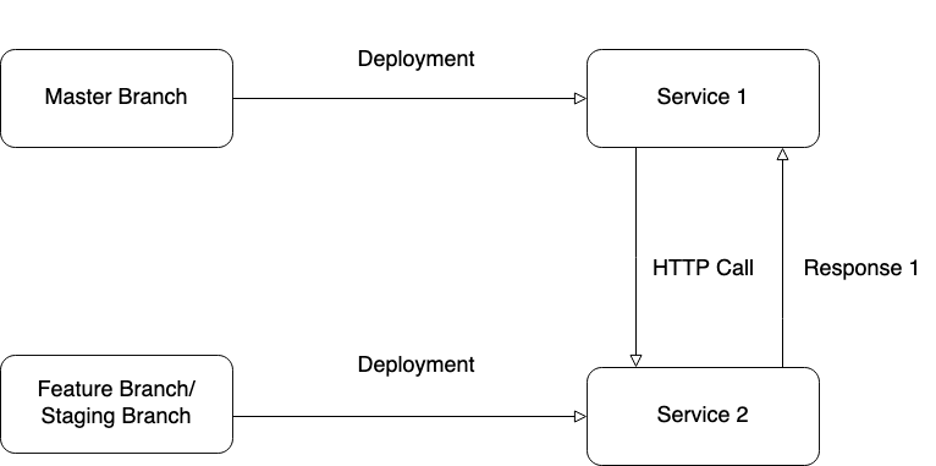
Figure 4: Staging environment under laying service giving Response 1
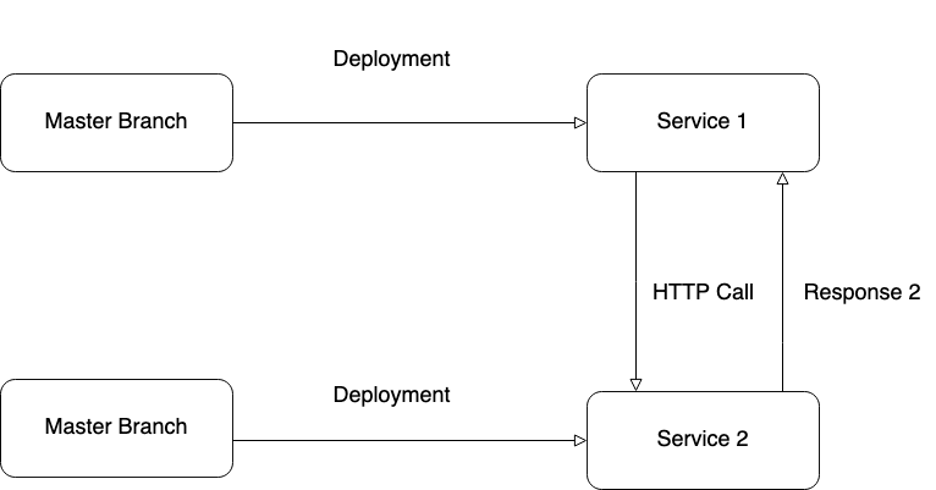
Figure 5: Production environment under laying service giving Response 2
Without effective developer testing, developers in certain teams often find themselves waiting to observe their code running for the first time on the staging environment. This situation is far from ideal, as it can significantly extend the development time. It also increases reliance on the rest of the team to temporarily halt their commits, often leading to requests such as, 'I'm conducting experiments on Staging; please refrain from committing any code for the next 3-4 hours.’
When we explored solutions for developer testing, we considered multiple suggestions. We explored options like using a separate Kubernetes namespace for testing and tools like Skaffold for a hybrid local and cloud cluster. However, these alternatives introduced significant cost and maintenance burdens and did not address the challenge of achieving high-fidelity testing in a production-like environment. As the team expanded, the once-new namespace eventually became the old staging, and we faced the same testing issues in this new namespace environment.
Local Cluster-based Testing
One potential solution we explored previously involved exposing our staging cluster's services via our internal VPN and running the process locally. While this approach partially worked, it required us to use ngrok to create a public endpoint for receiving traffic, which proved challenging to manage over time.
Using ngrok for traffic redirection from the shared staging environment still disrupted other developers' workflow and often resulted in inadequate testing for our code changes, ultimately slowing development. It became clear that isolating these code changes from each other was a critical aspect of maintaining agility within a large team.
Using Signadot for Isolated Testing and automation testing
We integrated Signadot into our Jenkins pipeline to automate sandbox creation whenever we raise pull requests. Every pull request automatically initiates the creation of sandboxed versions in our integrated repositories. Following sandbox creation, Jenkins executes an automated integration test with predefined user behavior for the application.
This process serves as a crucial check to ensure code quality and sanity. Signadot's header-based routing facilitates the routing of requests destined for that specific sandbox to the appropriate service, while responses from the sandbox are directed to the correct consumers.
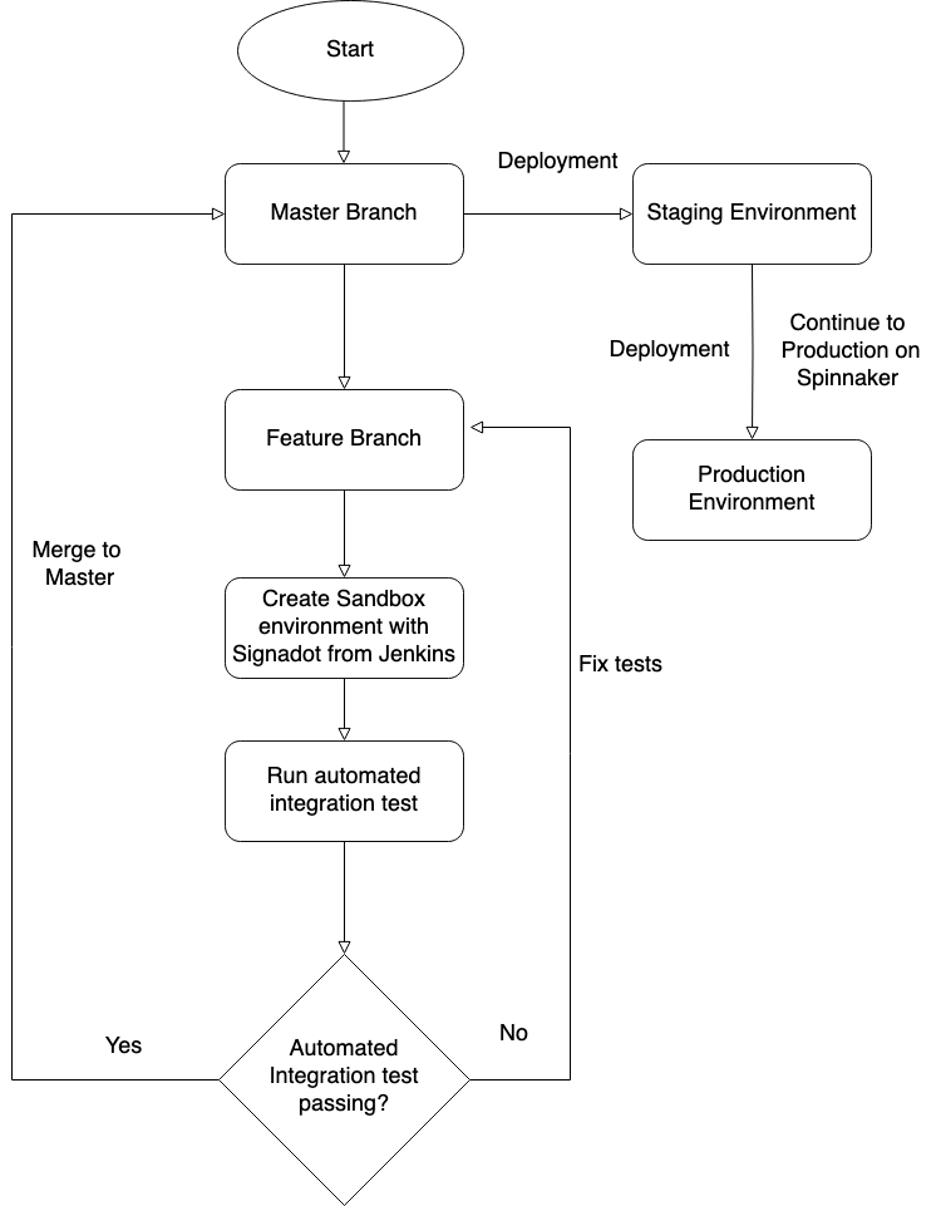
Figure 6: Automated Integration test flow on Signadot sandbox
Our current process, as depicted in Figure 6, unfolds as follows:
- The developer initiates a pull request for the feature.
- Jenkins generates a sandbox for the service feature change and conducts an automated integration test, incorporating predefined user behaviour for the application. If the test passes in Jenkins, we can merge the feature branch into the master; otherwise, we need to address and fix the failing tests.
- Once a sandbox is created, backend developers can share its details with frontend developers for feature integration and with the QA team for manual/acceptance testing purposes.
- They insert the corresponding routing key into the debug version of our mobile application, first for frontend integration and subsequently for QA testing.
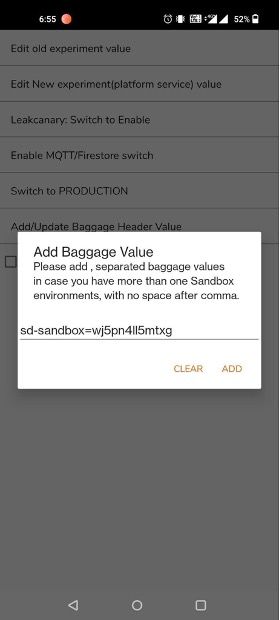
5. Users can then run tests against their version of the service change without impacting others.
6. Finally, we merge to master.
The benefits of more accurate testing
Implementing more accurate manual testing and automated integration tests has significantly boosted our developer velocity. By eliminating bottlenecks in the Staging deployment process, our engineers can dedicate more time to delivering features than troubleshooting deployment issues.
A specific instance occurred when a developer from another team approached me with an issue related to their Signadot container. The sandbox failed to start correctly after a new merge. Upon closer inspection, I identified the problem as an uninitialised value in the developer's branch. If this issue had made it to the Staging environment, it could have caused substantial disruption, potentially bringing down the entire Staging environment instead of just causing a local problem! Developers now only need to create a single pull request for a feature, resulting in fewer merge conflicts, enhanced team productivity, and improved work efficiency. This change saved approximately two-thirds of developer effort related to Git.
The improved accuracy in testing allowed us to remove some of the restrictions we had previously imposed on merges. As a result, deployments that would have taken weeks to roll out to Production are now completed in just a matter of days.