Making devs lives easier: Local assets optimization services [Part II]

Himanshu Dwivedi28 Apr, 2022


Written by Himanshu Dwivedi
Have you checked out part I of our blog series? If not, please read it here.
After making an image compression service, we decided to take up video compression next. Short videos are often part of our web-cards, PWAs etc. With our compression service, those videos will be ready-made for uploading without any extra work.
We have created a CLI tool to cater the needs of our fellow devs who are more comfortable with the terminal. It has even more features than Automator workflows and provides better control over compression parameters.
Our end goal was to have a fast and efficient compression flow which could ensure mobile-friendly optimisations. Let's check out the techniques we employed to do the same.
Video Compression
We added video compression to our features list. We are using FFmpeg for video encoding. For mp4 and mov types, we are using the most popular video encoder MPEG-4 Advanced Video Encoder also known as H.264.
We are using the following compression settings to get the compression standards close to other popular social media platforms.
- One pass ABR encoding with an average bitrate close to 1000kbps
- Maximum frame rate equal to 30fps
- Maximum resolution (height) equal to 720p with original aspect ratio
- H264 basic profile
- Audio bitrate close to 64kbps
- Strips all metadata
Apart from that we have also applied faststart which helps to start the video before fully downloading it on the web to reduce the waiting time for the users.
These settings are primarily for our own use case on both desktop and mobile devices. However we'll be adding more granular control via the CLI tool in future.
Size / Quality Control
Following is the comparison of different video encoding techniques at similar bitrate / quality.
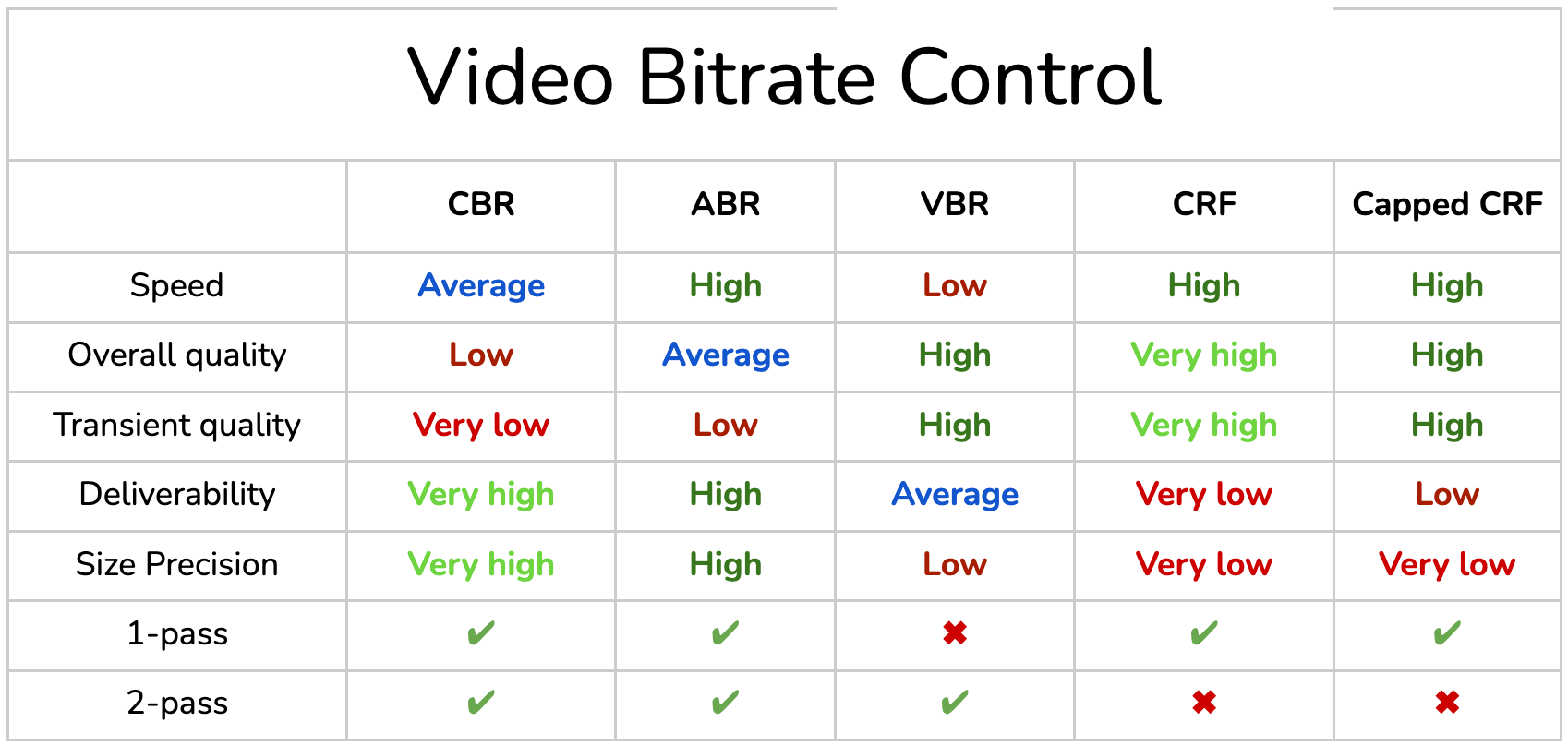
We are focusing on high deliverability, high speed and good quality compression. Therefore we are going with 1-pass average bitrate (ABR) encoding.
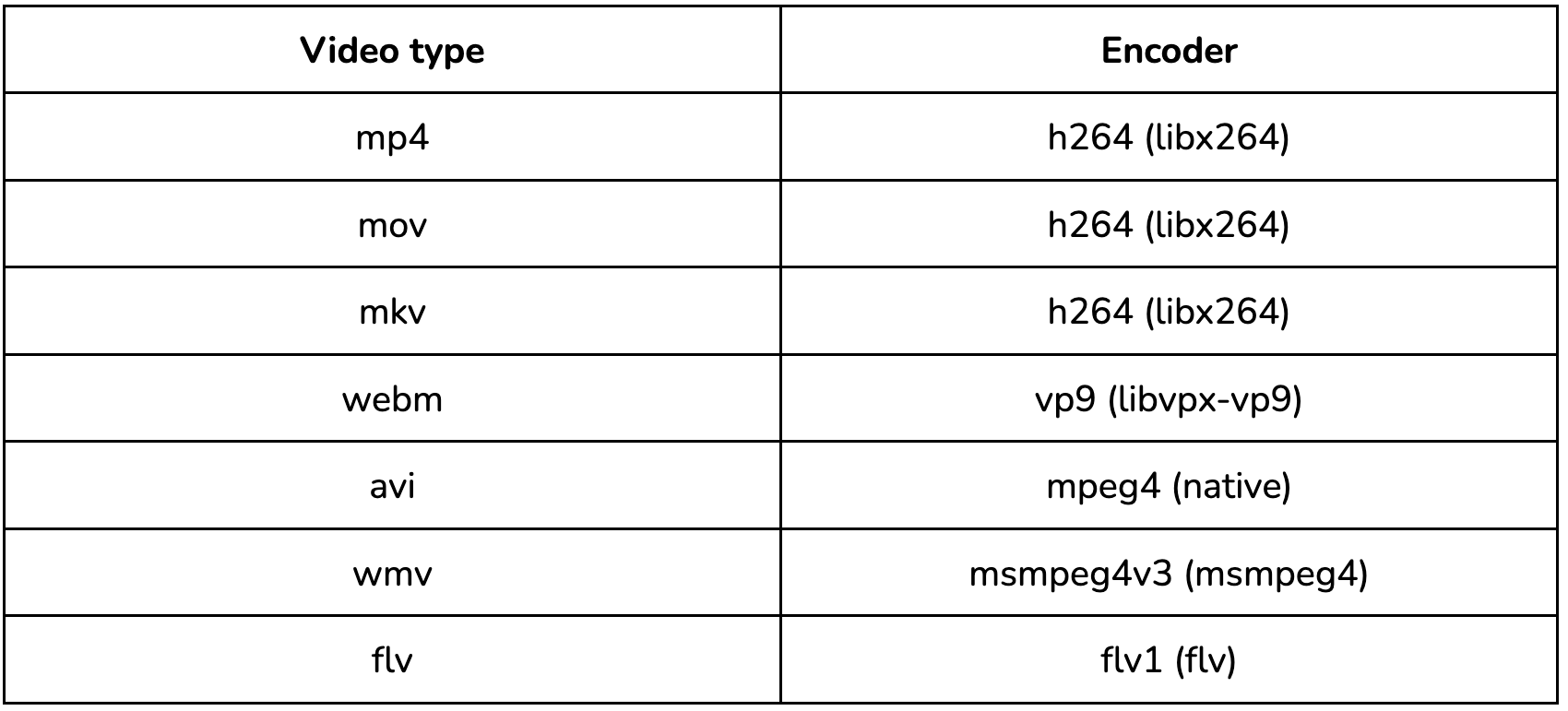
Supported types with encoders
Following is the complete list of supported video types with their encoders used.
PNG Compression
PNG is a lossless format. Lossless compression will not yield the same result provided by tinypng which provides smart lossy compression. For that reason, we are now using pngquant to convert the RGBA image to palette-based 8-bit indexed image. This image quantization technique can reduce the png size by more than 65%.
It reconstructs the whole image by selecting 256 prominent colors and dithering them across each other to provide the illusion of other colors. Most of the time you cannot differentiate the color change by naked eye.
We are using optimal settings to give a visually lossless effect with high reduction in image size.
Automator Workflow
You can also download the quick action workflow for image and video compression.
Run the following command in your terminal.
1brew install ffmpeg pngquant
Download “workflows.zip” from here and extract the .workflow file into your ~/Library/Services folder.
That's it. For more details and demonstration on how to use the automator workflow, check out the part I of our blog series here.
CLI Tool
For developers comfortable with command line terminal, we have made a CLI tool for our compression service called “ffopti”. You can compress many images, videos simultaneously or even a folder. It will handle the extraction, filtration and chunking to compress it very fast without consuming all the CPU power.
It was able to compress a folder of ten 4k videos with size 564.5mb to 28.8mb in 70 seconds. Thus it is quite fast and provides a high amount of compression.
With options, you can modify suffix or even replace original files. You can also show compression stats showing how many files were compressed of each type and how much time it took for the same.
ffopti is completely built on the latest version of nodeJS with external dependencies on FFmpeg and pngquant. It is deployed on Homebrew as an external package.
Demo

Prerequisites
Installation
Please run the following commands in the terminal.
1 2brew tap ShareChat/ffopti brew install ffopti
In case of a new version, you only need to brew install again.
Usage
1ffopti [options] [input] [input]...
where input is file or directory.
Supported formats
Images: jpg, png, webp, bmp, tiff, gif
Videos: mp4, mov, webm, mkv, avi, wmv, flv
Options
--help
Show help
--version
Show version number
-r, --replace
Replace original
-s, --silent
Run quietly with no info
--suffix [suffix]
Final compressed path suffix (default is “_cmp”)
--stats
Show compression stats
Conclusion
Our CLI tool is up and running and we will keep providing version updates with new features like lossless compression, type conversion, resize and many more. Please look out for the change logs in our github repo here.
In case of any issues, suggestions you can email us at himanshudwivedi@sharechat.co. Keep compressing :)
Cover illustration by Ritesh Waingankar