Migrating 1000+ event contracts from JSON to Protobuf

Nilesh Kevlani28 Apr, 2026



At ShareChat, we recently overhauled the architecture of our events ingestion system. As part of this exercise, we also migrated all our event data contracts from JSON to protobuf. The migration was motivated by a few things pulling in the same direction: stronger schema enforcement, type safety across publishers and consumers, a single contract format shared end-to-end (publisher → Kafka → warehouse), and reduced payload size on the wire and in storage.
Making changes in FE (frontend) to start publishing all events in protobuf format was going to take time. Waiting for this would have delayed the JSON to protobuf migration. More on this is mentioned in the Background section.
In typical use cases for creating protobuf payloads, developers rely on language-specific files generated from protobuf contract files using the protoc command. However, generating and maintaining such files for 1000+ contracts is not feasible. We therefore needed a solution that can understand all contracts and handle the conversion in a generic, scalable manner.
In this post, we’ll walk through how we at ShareChat successfully migrated 1000+ event contracts from JSON to protobuf.
There are several aspects to this migration, but we will focus on how we convert JSON data being received from FE to protobuf using a generic platform solution.
Background
The system’s simplified architecture was something like this:
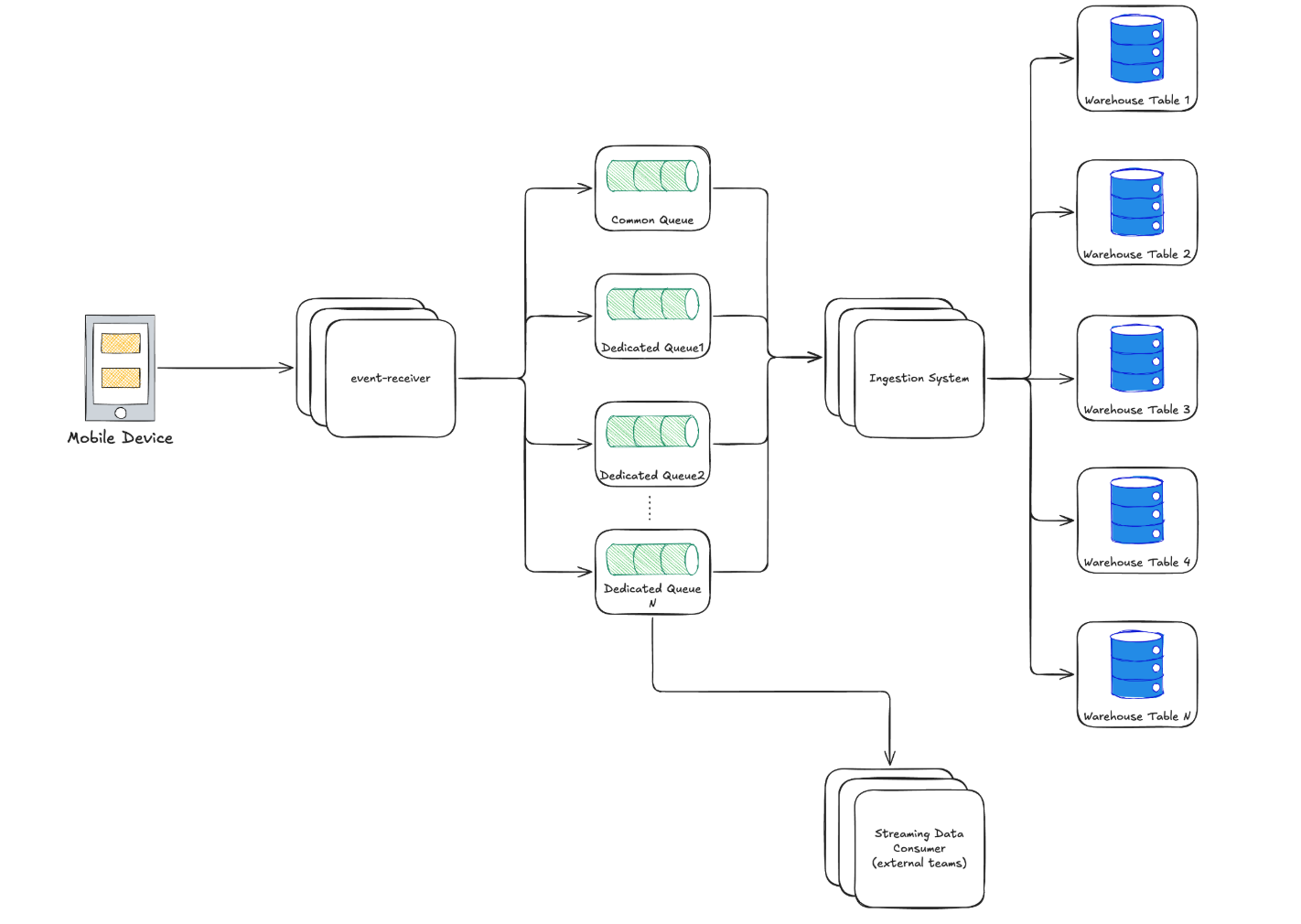
Here are some key points about this architecture:
- We have an event receiver service that receives event data from FE. An event here refers to an action taken by a user on FE. Some examples of events are Home Opened, Video Play, etc.
- All events are sent to a Kafka topic. This event is either a dedicated topic or a common topic.
- All output topics are consumed by the warehouse ingestion system, which sends each event type to its own dedicated table.
- For dedicated topics, there might be one or more streaming consumer services, which are usually owned by a team outside of the data-platform team.
The data sent by FE is in JSON format. While our long-term aim is to ensure that FE itself sends protobuf encoded data, integrating contracts + making the change for all events in the FE codebase is a big effort and FE release takes time as well.
Maintaining two separate systems (one for JSON and another for protobuf) across the org (ingestion system in our team + numerous streaming consumers for a subset of events) is not viable.
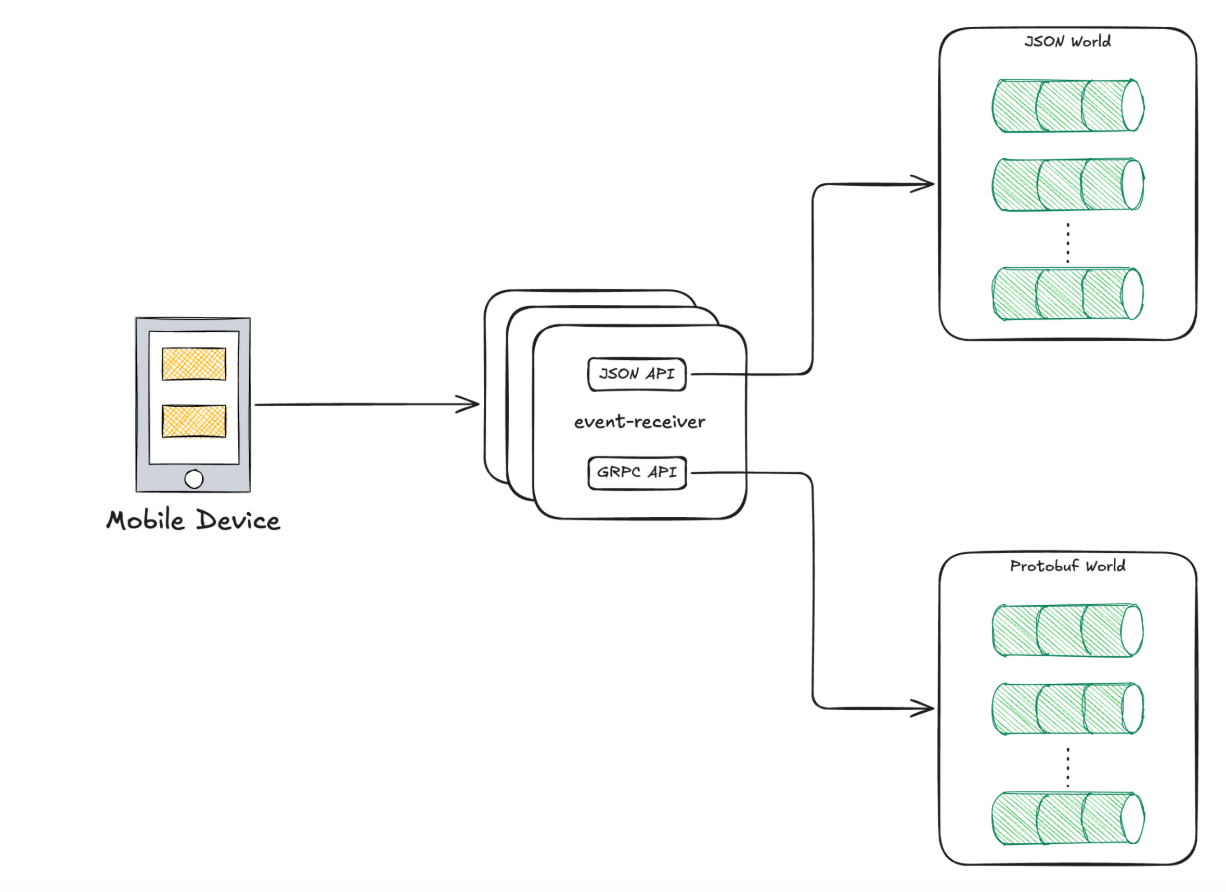
To resolve this, we added a conversion layer between the FE and the rest of the consumers. With this, all consumers after the conversion layer can switch to the protobuf contract.
We leveraged warehouse table schemas to derive initial versions of the protobuf contract for all the events.
With that out of the way, let's dive into the details of how we approached the automatic JSON to protobuf conversion.
Existing Solutions
The service that hosts the conversion layer is written in Java. We explored existing solutions for automatically converting JSON data to protobuf. These solutions and their limitations were:
- JsonFormat
- JsonFormat does not handle conversion of types when converting JSON to protobuf. For example, if a field has type int and the value for that field in the jsonNode is 3.14, then JsonFormat will throw an exception during conversion.
- Another minor point is:
JsonFormat.Parser.merge- the method used for conversion takes JSON in stringified format as input. This adds the penalty of converting JsonNode from our codebase to string and then again parsing this string in JsonFormat’s codebase.
- jackson-datatype-protobuf
- The jackson-datatype-protobuf library requires the type of the messages being passed as an argument. For example,
mapper.readValue(json, HomeOpened.class). At the platform level, this is impractical because it requires us to ensure classes for all 1000+ events are available to the service and we need to ensure newly onboarded events’ classes are also made available to the service.
- The jackson-datatype-protobuf library requires the type of the messages being passed as an argument. For example,
To overcome these limitations, we wrote low level code to implement JSON to protobuf conversion using protobuf descriptors.
Our Solution
Let’s break the solution into three parts:
- Converting JSON to protobuf using descriptor.
- Extracting the descriptor for a given event type.
- Generating the descriptor for all contracts.
Converting JSON to Protobuf
DynamicMessage provides a nice API to be able to construct arbitrary protobuf messages using messageBuilder.setField.
Code for the top level convert function takes a JsonNode and the protobuf message type that it needs to convert the JsonNode into. It looks like this:
1 2 3 4 5 6 7 8 9 10 11 12 13public Message convert(JsonNode jsonNode, String protobufMessageTypeFullname) { // More on how to obtain the descriptor is shared in the following section. Descriptor descriptor = ...; DynamicMessage.Builder messageBuilder = DynamicMessage.newBuilder(descriptor); populateBuilder(jsonNode, messageBuilder); return messageBuilder.build(); }
Once we have the message builder, we can use the messageBuilder.setField API to construct the message.
1 2 3 4 5 6 7 8 9 10 11 12 13 14 15 16 17 18 19 20 21 22 23private void populateBuilder(JsonNode jsonNode, Message.Builder messageBuilder) { for (FieldDescriptor field : messageBuilder.getDescriptorForType().getFields()) { String fieldName = field.getName(); if (jsonNode.hasNonNull(fieldName)) { JsonNode valueNode = jsonNode.get(fieldName); setField(messageBuilder, field, valueNode); } } } private void setField(Message.Builder messageBuilder, FieldDescriptor field, JsonNode valueNode) { Function<JsonNode, Object> converter = getConverter(field); if (field.isRepeated()) { for (JsonNode element : valueNode) { messageBuilder.addRepeatedField(field, converter.apply(element)); } } else { messageBuilder.setField(field, converter.apply(valueNode)); } }
getConverter helps in converting JsonNode objects to primitive types.
1 2 3 4 5 6 7 8 9 10 11 12 13 14 15 16 17private Function<JsonNode, Object> getConverter(FieldDescriptor field) { return switch (field.getJavaType()) { case INT -> JsonNode::asInt; case LONG -> JsonNode::asLong; case FLOAT -> JsonNode::floatValue; case DOUBLE -> JsonNode::asDouble; case BOOLEAN -> JsonNode::asBoolean; case STRING -> JsonNode::asText; case MESSAGE -> jsonNode -> { Message.Builder nestedBuilder = DynamicMessage.newBuilder(field.getMessageType()); populateBuilder(jsonNode, nestedBuilder); return nestedBuilder.build(); }; default -> throw new IllegalArgumentException( "Unsupported field type - " + field.getName() + "(" + field.getJavaType() + ")"); }; }
Extracting descriptor for a given type
As seen in the above part, we need to have a descriptor for a given message type to be able to convert JSON data for this event to its protobuf format.
We got a lot of inspiration from https://gist.github.com/johnllao/5ffbe24a021891e7d887 on how to achieve this.
Let's see how we can do that.
With a descriptor file, we can extract all the message definitions.
1 2 3 4 5 6 7 8 9 10 11 12 13 14 15 16 17 18 19 20 21 22 23 24 25 26 27 28 29 30 31 32 33 34 35 36 37 38 39 40 41 42 43 44 45 46 47 48 49 50 51 52 53 54 55 56 57 58 59 60public class ProtobufMessageNameToDescriptorExtractor { private final Map<String, Descriptor> messageTypeToDescriptorCache = new HashMap<>(); private final Map<String, FileDescriptor> fileNameToFileDescriptorCache = new HashMap<>(); public ProtobufMessageNameToDescriptorExtractor(InputStream descriptorFile) throws Exception { FileDescriptorSet descriptorSet = FileDescriptorSet.parseFrom(descriptorFile); Map<String, FileDescriptorProto> fileNameToFileDescriptorProto = new HashMap<>(); // In first iteration, we collect all the files as we will need the file mapping is prerequisite of the next // step. descriptorSet.getFileList().forEach(fileDescriptorProto -> { fileNameToFileDescriptorProto.put(fileDescriptorProto.getName(), fileDescriptorProto); }); descriptorSet.getFileList().forEach(fileDescriptorProto -> constructFileDescriptor(fileDescriptorProto, fileNameToFileDescriptorProto) .getMessageTypes() .forEach(descriptor -> messageTypeToDescriptorCache.put(descriptor.getFullName(), descriptor))); } private FileDescriptor constructFileDescriptor(FileDescriptorProto fileDescriptorProto, Map<String, FileDescriptorProto> fileNameToDescriptorFileProto) { if (fileNameToFileDescriptorCache.containsKey(fileDescriptorProto.getName())) { return fileNameToFileDescriptorCache.get(fileDescriptorProto.getName()); } List<FileDescriptor> dependencies = new ArrayList<>(); fileDescriptorProto.getDependencyList().forEach(dependencyFile -> { FileDescriptorProto dependencyFileDescriptorProto = fileNameToDescriptorFileProto.get(dependencyFile); if (dependencyFileDescriptorProto == null) { throw new IllegalStateException("Could not find file descriptor proto for dependency: " + dependencyFile); } FileDescriptor dependencyDescriptor = constructFileDescriptor(dependencyFileDescriptorProto, fileNameToDescriptorFileProto); dependencies.add(dependencyDescriptor); }); try { FileDescriptor fileDescriptor = FileDescriptor.buildFrom(fileDescriptorProto, dependencies.toArray(new FileDescriptor[0])); fileNameToFileDescriptorCache.put(fileDescriptorProto.getName(), fileDescriptor); return fileDescriptor; } catch (DescriptorValidationException e) { throw new IllegalStateException(e); } } public Descriptor getDescriptor(String messageType) { return messageTypeToDescriptorCache.get(messageType); } }
All of these are enough to populate messageTypeToDescriptorCache. This will help us get the descriptor that we were using for creating the DynamicMessage‘s builder object in the top level method.
Generating Descriptor File
The code in the previous section was using InputStream descriptorFile. This is a descriptor file, which is generated from the protobuf contracts. This section explains how that is done.
To ensure the system recognizes contracts for newly onboarded events, we set up a workflow that generates a descriptor for all the event contracts and pushes them to Google Cloud Storage (GCS). This workflow triggers for each new contract being onboarded, as well as for changes in existing contracts. For generating descriptor, this can be used:
1 2 3 4 5protoc \ --descriptor_set_out=event-contracts.desc \ --include_imports=true \ --include_source_info=true \ $(find ./proto/ -regex ".*proto")
The JSON to protobuf converter polls GCS at a fixed interval to check if the descriptor in GCS has been updated. If there is any new event contract added, the converter loads its descriptor as well and stores it in its type mapping.
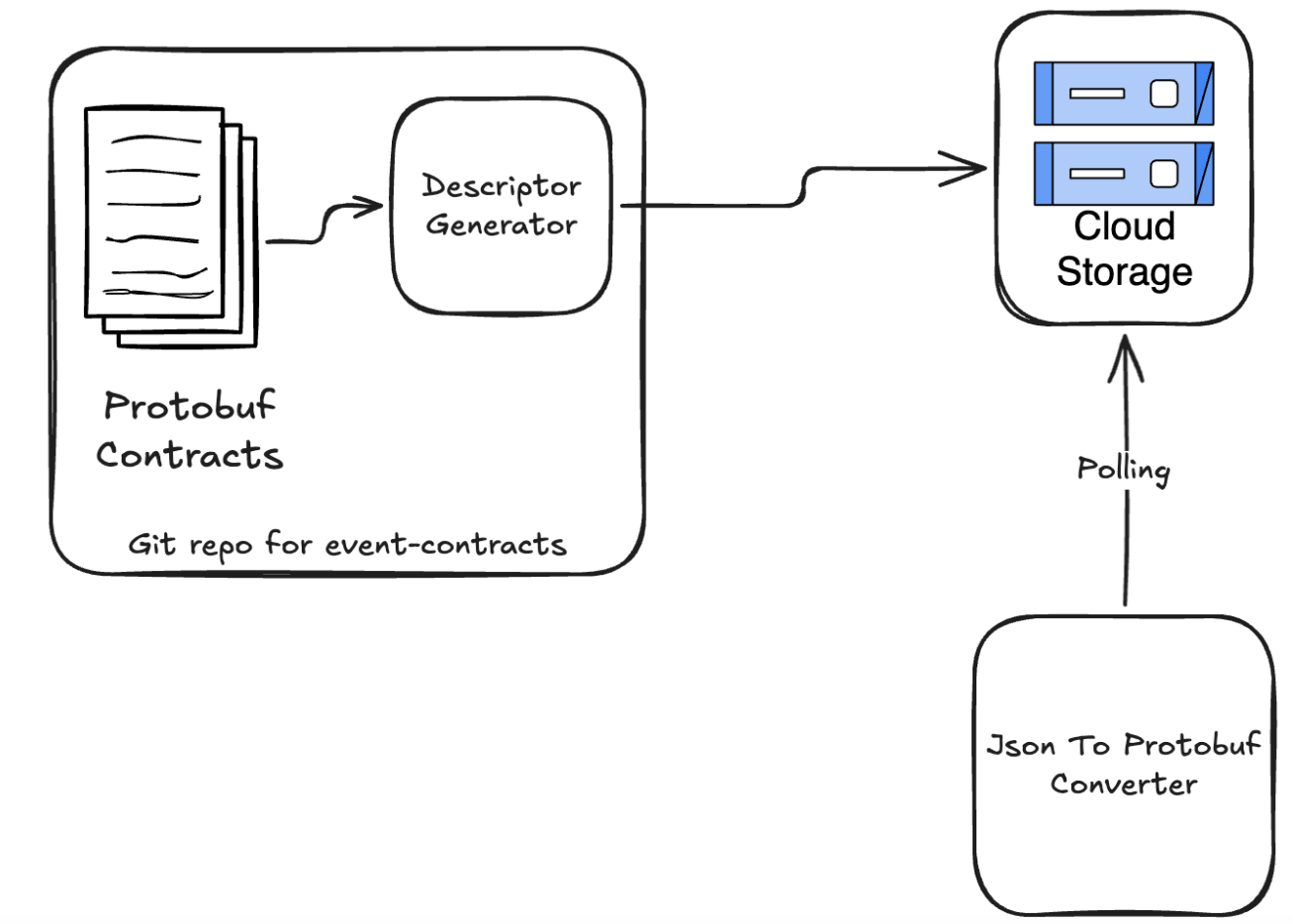
This way, the conversion layer is able to understand and handle the contract for newly onboarded events without any external effort like deployment or restart.
Wrapping up
With all the required pieces in place, we could use the code samples shown above to convert JSON data to protobuf data in a generic, platformized way. This helped in decoupling producers and consumer migrations and resulted in faster migration completion.
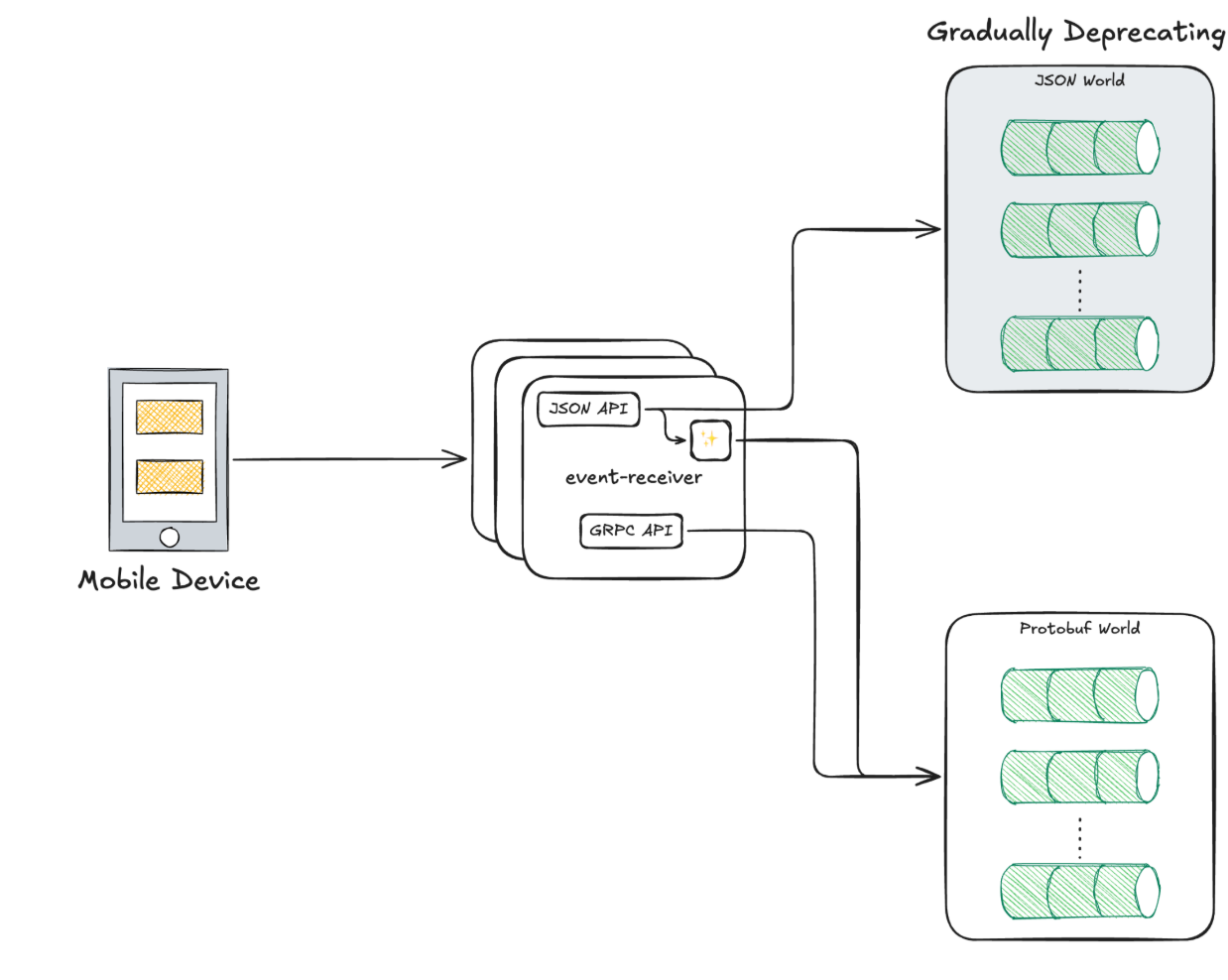
While this provided us with a clear way to move the events from JSON format to protobuf format easily, we also needed a way to validate the conversions. We did that by writing migration tooling, which performed validation as a step against data in the warehouse to make sure that we are able to cover all the cases when converting the data without missing any edge cases.