Simplifying Image Uploads on Web with Google Image Picker

Alok Singh and Amit Shukla2 Jan, 2023



Introduction
Google Image Picker is an npm plugin that helps you upload images directly from your web application without going through all the hassle of searching on your browser, downloading, and then uploading to the server.
Problem Statement
As we studied the issue, we realized that the entire process of searching the image in file manager, downloading and uploading is a tedious and time consuming task. At ShareChat, staying true to our value of ‘Speed’, we wanted to develop a method that helped us simplify this process and streamline it completely.

Solution
We developed a plugin that will allow users to directly upload images from the web application itself. For creating this plugin, we didn't use any framework-specific APIs and relied on Javascript's Mutation Observer API and Google Custom Search API, thus making this package independent of web frameworks.
Now let's talk about these two terms in detail.
Programmable Search Element Control API: The Programmable Search Element Control API lets you embed the Programmable Search Element in your web pages and other web applications using JavaScript.
Let's look at what this Programmable Search Element is.
The Programmable Search Element is a combination of two components,
i.e., search boxes and search results pages. There are different types of search elements available in the API
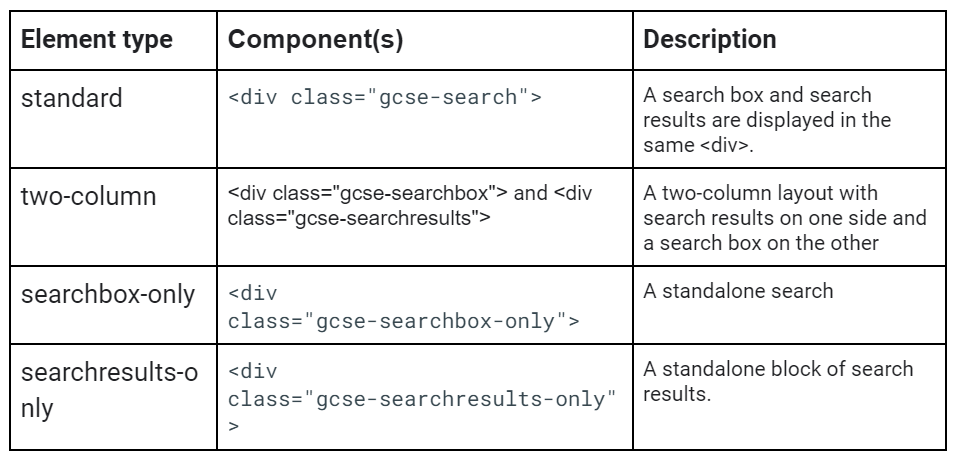
For Google Image Picker, we used the standard element type.
Programmable Search Elements come with a lot of customization like whether you want to open the result in a different window or enable autocomplete or not and many more. You just have to add queryParameterName attribute is prefixed with data-.
For Ex: <div class="gcse-search" data-newWindow="true">
You can use this list of supported attributes according to your needs.
Mutation Observer: This is a built-in JS object, it keeps track of DOM elements and fires a callback whenever a change is detected.
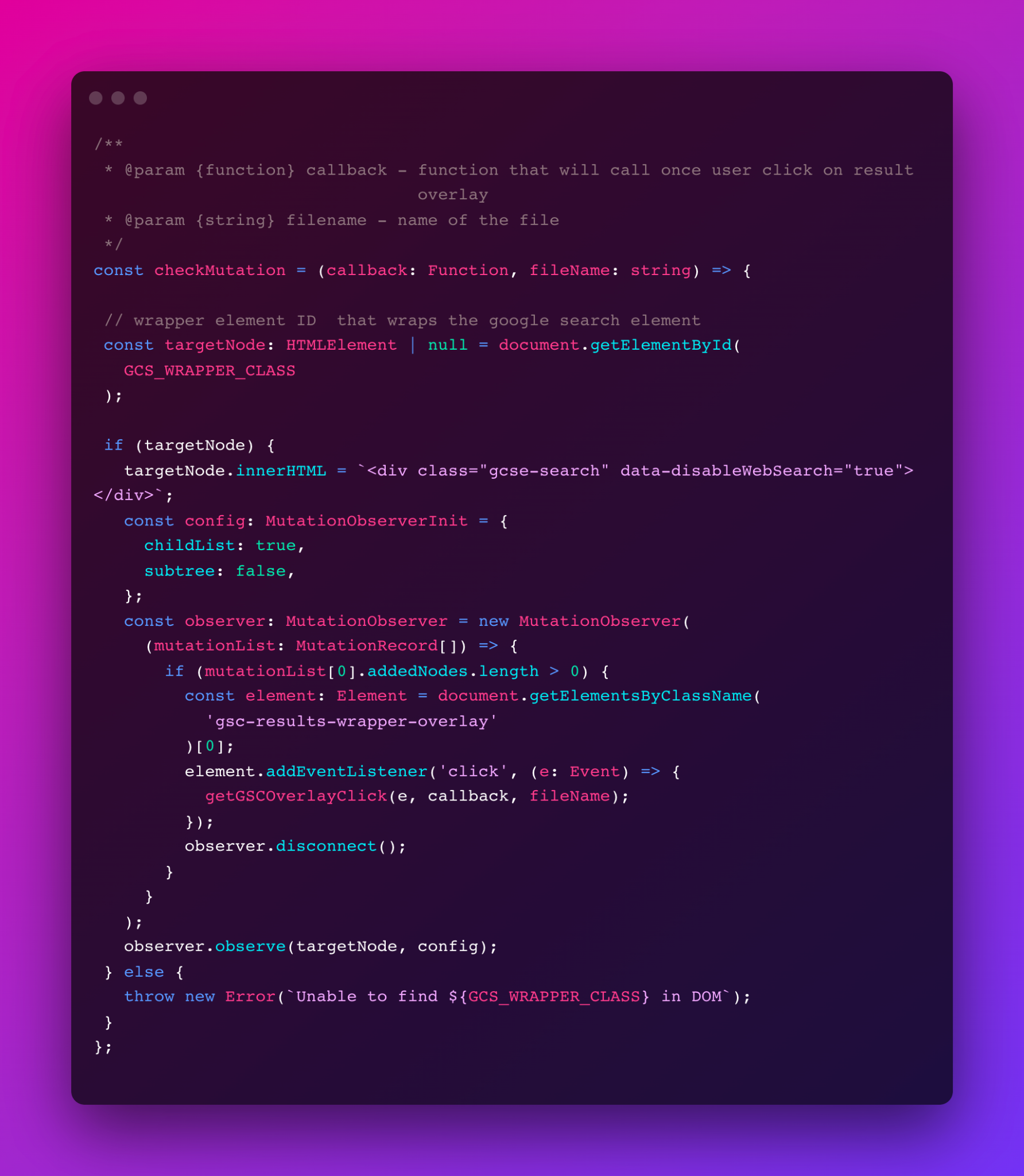
Now you have the definition, but how we use it is quite interesting, because Google only provides an overlay of image lists after the user searches any image over that. The entire overlay is dynamically injected in the DOM, so technically we do not have access to the images right away.
For Google Image Picker, we have to take control of the overlay as soon as the user searches for any image. For this, we use mutation observer, as mutation observer needs a node for observation, so we provided the element that is given via google customized search API <div class="gcse-search" data-disableWebSearch="true"></div>
So now whenever the user searches any image following things will happen:
- Google result overlay will inject inside this div.
- Mutation observer calls the callback.
- Inside this callback we will attach click event listener to the Google result overlay.
- Whenever the user clicks any image, we extract the hyperlink and convert it to a file and return this file.
Access API Key:
https://cse.google.com/cse.js?cx={ApiKey} here the Api key is basically cx value
You can access API Key by referring following link
Implementation:
Install @mohalla-tech/google-image-picker from npm
Add a div <div id='gcse-wrapper'></div> in your html where you want to use google-image-picker
Call fetchGoogleCSEScript({callback,apiKey,filename}) when the dom is mounted with an object argument consisting of three property -
- callback function (mandatory)
- apiKey string (mandatory)
- fileName string (optional) if not provided then default value is image
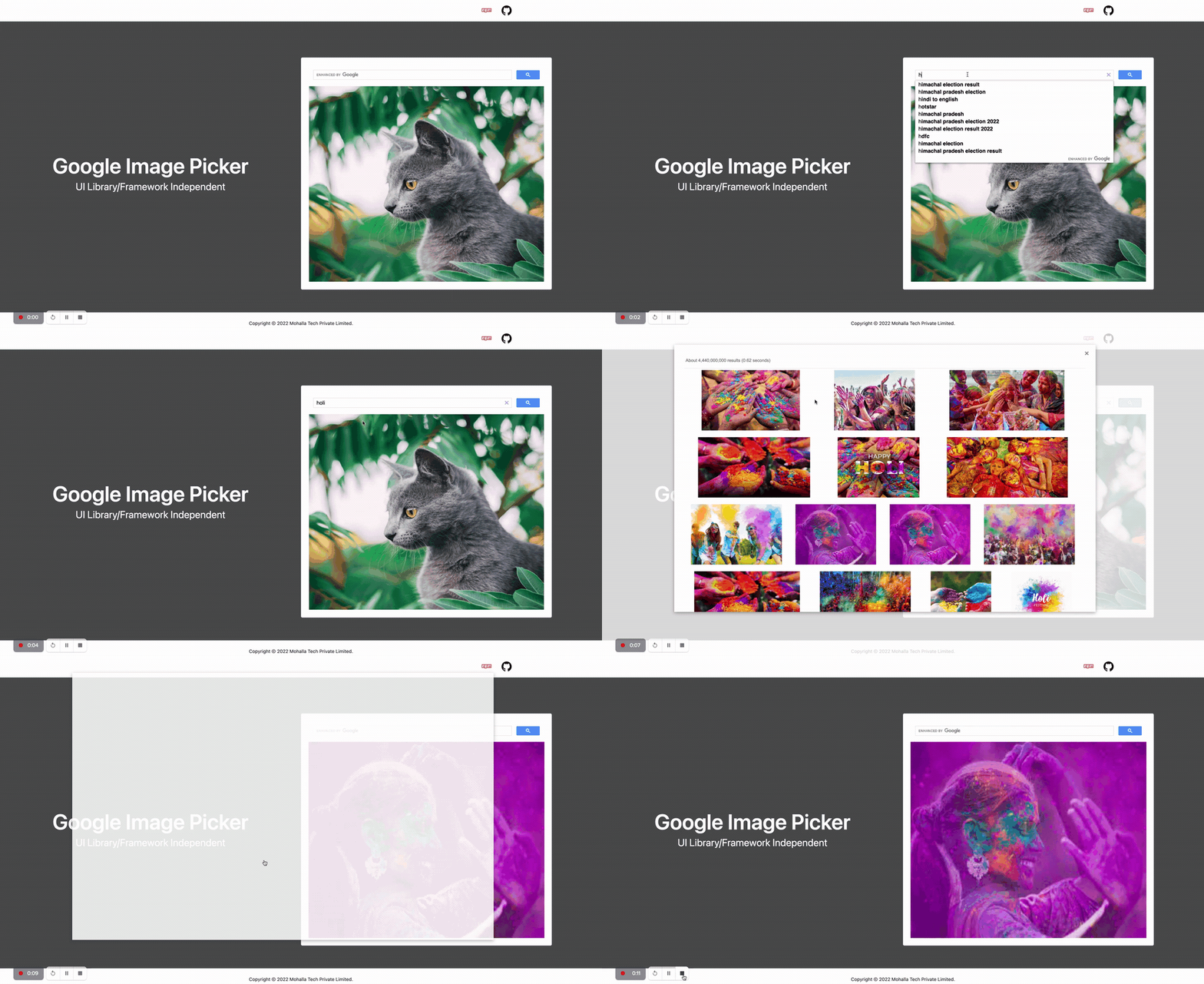
When you click any of the images in the demo, the callback function will return an object (file: file; blob: string)
Demo
Usage With Libraries/Framework
React:
Playground
1 2 3 4 5 6 7 8 9 10 11 12 13 14 15 16 17 18 19 20 21 22 23 24 25 26import { useEffect, useState } from 'react'; import { fetchGoogleCSEScript } from '@mohalla-tech/google-image-picker'; function App() { const [image, setImage] = useState(null); useEffect(() => { fetchGoogleCSEScript({ callback: uploadImage, apiKey: <API_KEY>, fileNmae: 'notification', }); }, []); const uploadImage = ({ file, blob }) => { setImage(blob); }; return ( <div> <div id="gcse-wrapper"></div> <img width="300" height="300" src={image} alt="" /> </div> ); } export default App;
Vue:
Playground
1 2 3 4 5 6 7 8 9 10 11 12 13 14 15 16 17 18 19 20 21 22 23 24 25 26 27 28 29 30 31 32 33<template> <div id="app"> <div id="gcse-wrapper"></div> <img width="300" height="300" :src="image" alt="" /> </div> </template> <script> import { fetchGoogleCSEScript } from "@mohalla-tech/google-image-picker"; export default { name: "App", data() { return { image: null, }; }, mounted() { fetchGoogleCSEScript({ callback: this.uploadImage, apiKey: "a749032cf5", fileName: "notification", }); }, methods: { uploadImage({ file, blob }) { this.image = blob; }, }, }; </script> <style></style>
Solid JS:
1 2 3 4 5 6 7 8 9 10 11 12 13 14 15 16 17 18 19 20 21 22 23 24 25 26import { onMount, createSignal } from 'solid-js'; import { fetchGoogleCSEScript } from '@mohalla-tech/google-image-picker'; function App() { const [image, setImage] = createSignal(null); onMount(() => { fetchGoogleCSEScript({ callback: uploadImage, apiKey: 'a749032cf5', fileName: 'notification', }); }); const uploadImage = ({ file, blob }) => { setImage(blob); }; return ( <div> <div id="gcse-wrapper"></div> <img width="300" height="300" src={image()} alt="" /> </div> ); } export default App;
Svelte
1 2 3 4 5 6 7 8 9 10 11 12 13 14 15 16 17 18 19 20 21 22 23<script> import { onMount } from "svelte"; import { fetchGoogleCSEScript } from "@mohalla-tech/google-image-picker"; let image = null; const uploadImage = ({ file, blob }) => { image = blob; }; onMount(() => { fetchGoogleCSEScript({ callback: uploadImage, apiKey: "a749032cf5", fileName: "notification", }); }); </script> <main> <div id="gcse-wrapper" /> <img width="300" height="300" src={image} alt="" /> </main> <style> </style>