Using proxies to make React state mutable

Akashdeep Patra16 Nov, 2022



Introduction
If you are building apps with react or redux for a long time you probably have seen some block of code like this
1 2 3 4 5 6 7 8case 'some_case': return { ...state, keyOne:{ ...state.keyOne, someProp: payload } }
And there's nothing uglier than a bunch of redundant lines of code so that your state can understand you're doing something with it. That was one of the most fundamental Architectural flaws/questions React team faced after the introduction of frameworks like Vue, svelte, where every state you create is immutable by nature and listens to the state change by default even if you mutate the nested data.
And even libraries like the Redux toolkit uses immer under the hood to make the developer experience more seamless.
Why does the scenario happen?
In React, all states are immutable by nature, which means whenever you need to change state, the data needs to be copied to a new memory address, or in other terms, some cost needs to be there, and this is not a problem for any primitive data types like strings or numbers. Because of this very nature of JS objects and how they are maintained in memory, changing one property inside the object doesn't change the top-level reference of that object, it only mutates it.
That's a problem for the setState method and useState hook. Unless it gets a new reference, it won't be able to know if the state has been mutated (because by default React uses shallow comparison).
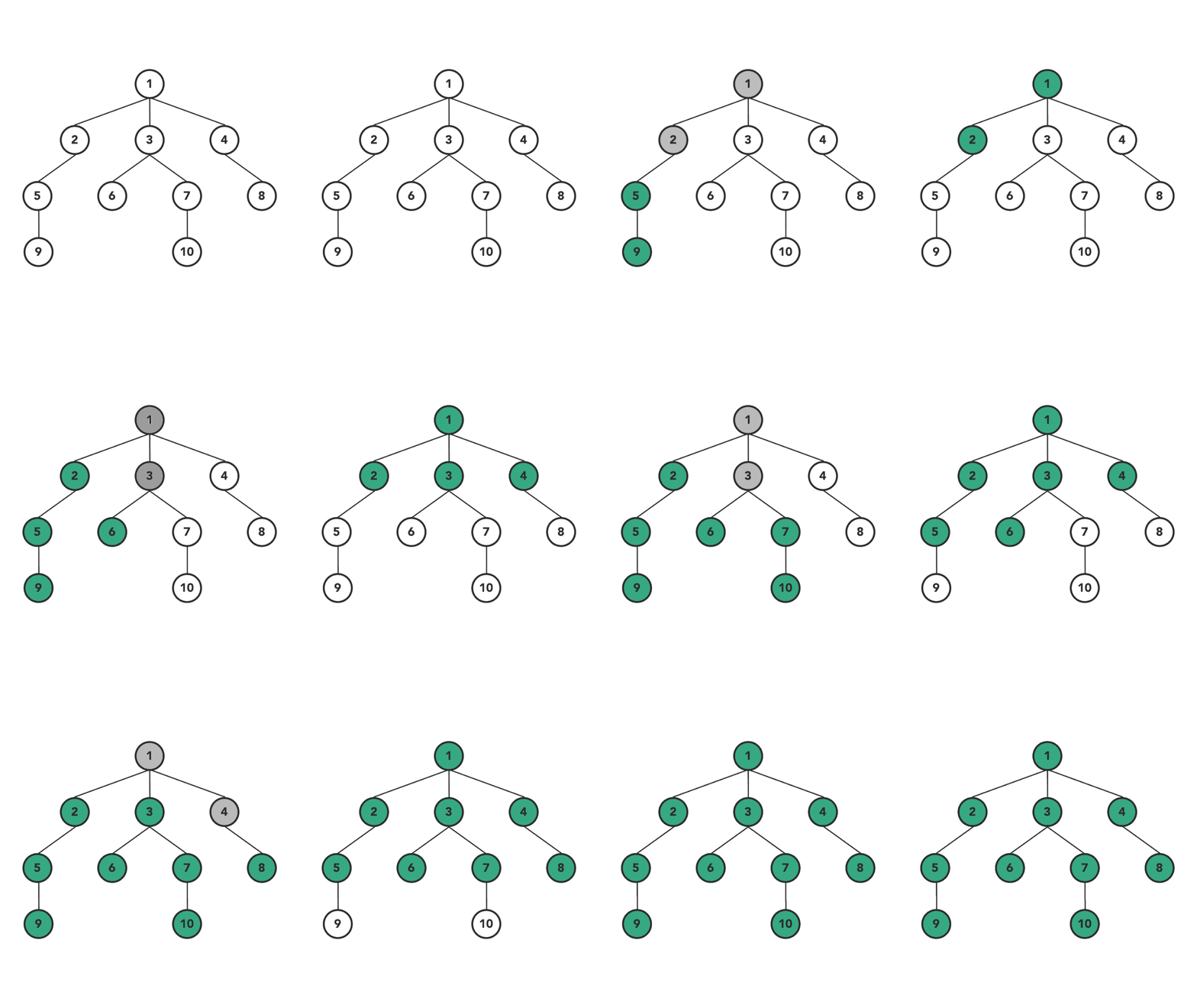
A question that crops up now is why go for shallow comparison at all?
Let's think about the object as a tree data structure and each property is a node in the tree. Now, what's the time complexity of a deep comparison in this case? O(n) [n being the number of nodes in the tree ], but the actual updated data would most likely be in O(1). So if you think about it, a deep comparison would be expensive most of the time, and that's why React's core team probably decided to go with shallow comparison as a default choice. However, you could override that behavior by using the shouldComponentUpdate() method in class-based components.
That means we probably can somehow do better than this and that's how Immer was introduced. And not only Immer but most of the modern UI frameworks also go for a similar solution to handle immutable states in a manner that seems mutable.
This approach follows a very ancient but powerful software design pattern called Proxy. On a very high-level proxy is an object that behaves like an interaction layer between the usage and the actual object from which it was created.
Source: Patterns.dev
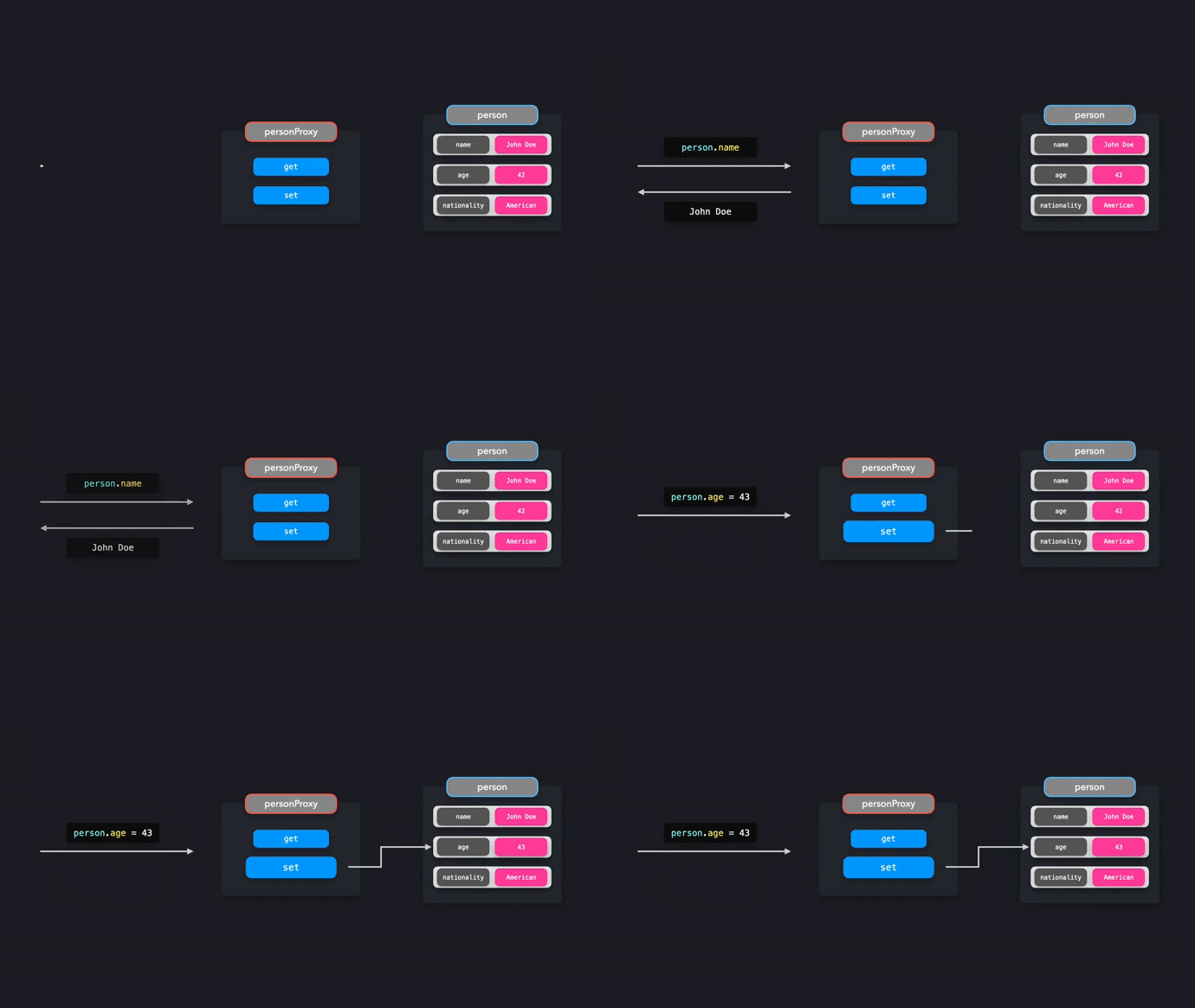
This alone gives us the superpower to control how the updates happen to our data and subscribe to get/set events as well. For this very reason, a lot of the modern UI frameworks use Proxies under the hood.
Today, let's try to re-create a very popular hook useImmer that uses Immer.js to use the proxy pattern to handle state updates.
Scope of this custom hook
[we are going be using typescript for this solution, but it would be similar in plain javascript as well]
1 2 3 4 5 6 7 8 9 10 11 12 13 14 15 16 17 18 19 20 21 22 23 24 25 26 27 28 29 30 31import useCustomImmer from "./hooks/useCustomImmer"; import { useEffect } from "react"; export default function App() { const [value, setValue] = useCustomImmer({ count: 0, name: { firstName: "Akashdeep", lastName: "Patra", count: 2, arr: [1, 2, 3] } }); const handleClick = () => { setValue((prev) => { prev.count += 1; prev.name.count += 1; prev.name.arr.push(99); }); }; useEffect(() => { console.log("render"); }); return ( <div className="App"> <button onClick={handleClick}>Click me </button> <br /> <span>{JSON.stringify(value)}</span> </div> ); }
For the sake of this example, we have a state which has some nested data and in the handle click method, we are mutating the properties provided by our setter function in the useCustomImmer hook. [This is supposed to trigger a re-render with the updated state.]
Now let's look at the solution
1 2 3 4 5 6 7 8 9 10 11 12 13 14 15 16export default function useCustomImmer( initialValue ) { const [value, setValue] = useState(initialValue); const listener =useCallback(debounce((target) => { setValue((prevValue)=>({...updateNestedValue(prevValue,target.path,target.value)})) },100),[]) const valueProxy = useMemo( () => new Proxy(value, createHandler([], listener)), [value, listener] ); const setterFunction = (func) => { func?.(valueProxy); }; return [value, setterFunction]; }
The hook signature would be similar to useState, where it returns an array where the first value is the state itself and the second value is the setter function. This function would take a callback that has an argument of the most updated state (similar to how useState's functional approach goes but here the argument state would not just be a normal object, instead it'll be a proxy of the original state).
We will create a Proxy with the state and keep it updated with the state changes.
Now here comes the problem, the listener we are attaching with the Proxy to monitor get/set events for properties on the state object only listens for top-level properties by default and they do not apply for nested properties [Check this link for a more detailed explanation of the API ].
To be able to solve this, we need to recursively attach a handler to our object, and for that, I have written a custom createHandler method that does the same.
1 2 3 4 5 6 7 8 9 10 11 12 13 14 15 16 17 18 19 20 21 22 23 24 25 26const createHandler =(path = [],listener) => ({ get: (target, key)=> { if (typeof target[key] === 'object' && target[key] != null ) return new Proxy( target[key], createHandler<any>([...path, key],listener) ); return target[key]; }, set: (target, key, value,newValue) => { console.log(`Setting ${[...path, key]} to: `, value); if(Array.isArray(target)){ listener?.({ path:[...path], value: newValue }) }else{ listener?.({ path:[...path,key], value }) } target[key] = value; return true; }, });
This method takes a string array and the listener as arguments and returns an object with get/set properties [You can extend this further to handle more cases].
Now let's break this down
In the get property, it takes the target and the key as an argument, and keep in mind this target is the nearest root from the property it's being accessed. So no matter how deep you go into a nested object, you'll only get the nearest parent reference.
Here, if the expected property is of type object and not null, we would create a new Proxy of that object with a recursive call and return that Proxy object instead of the actual object. When the user tries to access a nested property and in this listener, we also add the key so that we can track the path when we eventually call the listener.
This way, we don't create multiple nested proxies every time a state update needs to happen. Instead, we would create proxies only when someone tries to access these properties, and this would be much faster than going over all the nodes in that object since we know the path, to begin with (this means travel depth of O(log(n)) base n).
In the set property to handle an edge case we first check if the property is an array. When we do any array operation like push and pop apart from the item itself, the 'length' property is also changed. We could handle this edge case either in our handler or when we update the state. I chose to do that here. One thing to note is that there will be other data structures in javascript that will probably have their edge case. I created a very simple hook to demonstrate the overall architecture.
Each time we set the value, we also call the listener callback with a target object that would have the value and the path of the property that needs to be updated.
Now we also need a function that takes the path array and the value to update our source object, which is easy to come up with.
1 2 3 4 5 6 7 8 9 10 11 12 13const updateNestedValue =(object,path,value)=>{ const keys = path let refernce = object for(let i=0;i<keys.length-1;i++){ if(keys[i] in refernce){ refernce = refernce[keys[i]] } } if(keys[keys.length-1] in refernce){ refernce[keys[keys.length-1]] = value } return object }
And in our listener callback, we just update the old state and call the setValue method with the updated value.
1 2 3const listener =useCallback(debounce((target) => { setValue((prevValue)=>({...updateNestedValue(prevValue,target.path,target.value)})) },100),[])
I have used a debounce here because there are data structures like an array that have multiple properties changing with the proxy, but we only want to update the state once (This is more of a batching technique).
Here is a working Sandbox. However, please note that this hook is in no way production ready or will be in the future (nor does it handle any edge case).
Immer.js has a very extensible and tested design. This post is just a way to appreciate the way things work under the hood. And the reason is that there are a lot of data types (Maps, Set, etc) supported by native javascript for which implementing the proxy handler would be a chore.
We are hiring!
At ShareChat, we believe in keeping our Bharat users entertained in their language of preference. We are revolutionizing how India consumes content and the best in class Engineering technology is at the forefront of this transformation. In addition, you'll also get the opportunity to work on some of the most complex problems at scale while creating an impact on the broader content creation ecosystem.
Exciting? You can check out various open roles here!