Boosting Mobile App Efficiency by Optimizing Views

Soumyadip Bhattacharya8 Aug, 2024



In the realm of mobile application development, performance and user experience are paramount. This blog post explores an effective strategy to streamline fragment management in your app by revising the feed setup and implementing lazy loading. Here's how to enhance your app's efficiency by reducing the complexity of nested view pagers.
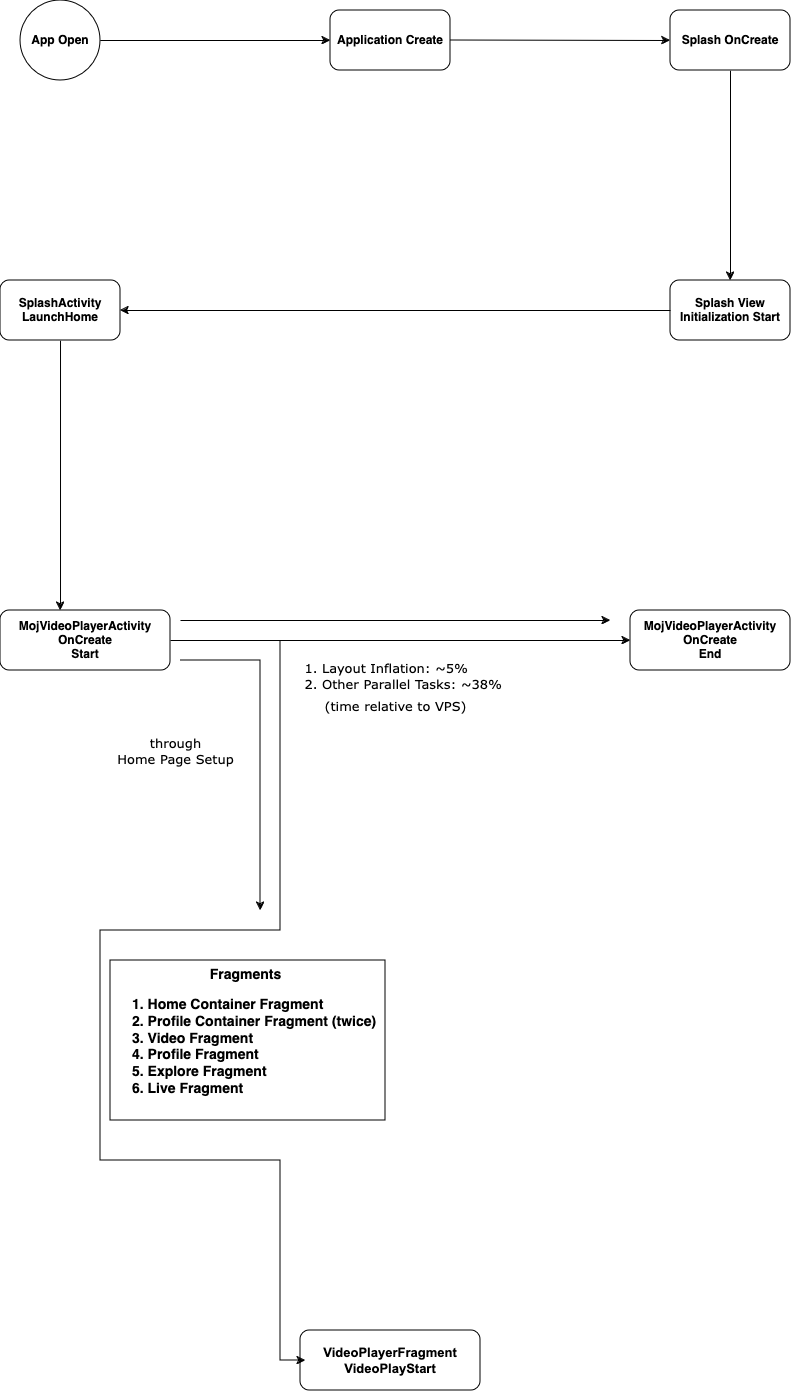
Understanding AO to VPS Time Mapping: Insights from Our Recent Study
In our continuous effort to improve system performance, we recently conducted a comprehensive analysis of AO (App Open) to VPS (Video Play Start) time mapping. This study is particularly valuable for those involved in optimizing app performance and ensuring efficient resource allocation. Below, we share the key findings and insights from our research.
Overview of the Study
Our study focused on mapping the time taken for various operations on an Android-based test device. The test device used was a Vivo 1811 running Android 8, equipped with 3 GB of RAM. A total of 1000 samples were taken to ensure the robustness and reliability of our findings.
Methodology
The methodology involved detailed time measurements of different operations performed on the Android device. A bash script was used to run the application for 1000 iterations and collect the logs. The aim was to identify any delays or inefficiencies in the interaction between the app open and video play start, thereby providing a foundation for further optimization.
Key Findings
- Consistency in Response Times: Across the 1000 samples, the response times from the VPS were remarkably consistent. This indicates a stable performance of the VPS under the test conditions, which is critical for applications requiring high reliability.
- Impact of Device Specifications: The specifications of the test device, particularly the RAM and the version of Android, played a significant role in the performance metrics. Devices with lower RAM or older versions of Android might exhibit different performance characteristics.
- Optimization Opportunities: The data revealed several opportunities for optimization, particularly in the handling of concurrent operations and data processing tasks. By addressing these areas, we can significantly enhance the overall performance and responsiveness of the system.
Current Setup: Understanding the Bottlenecks
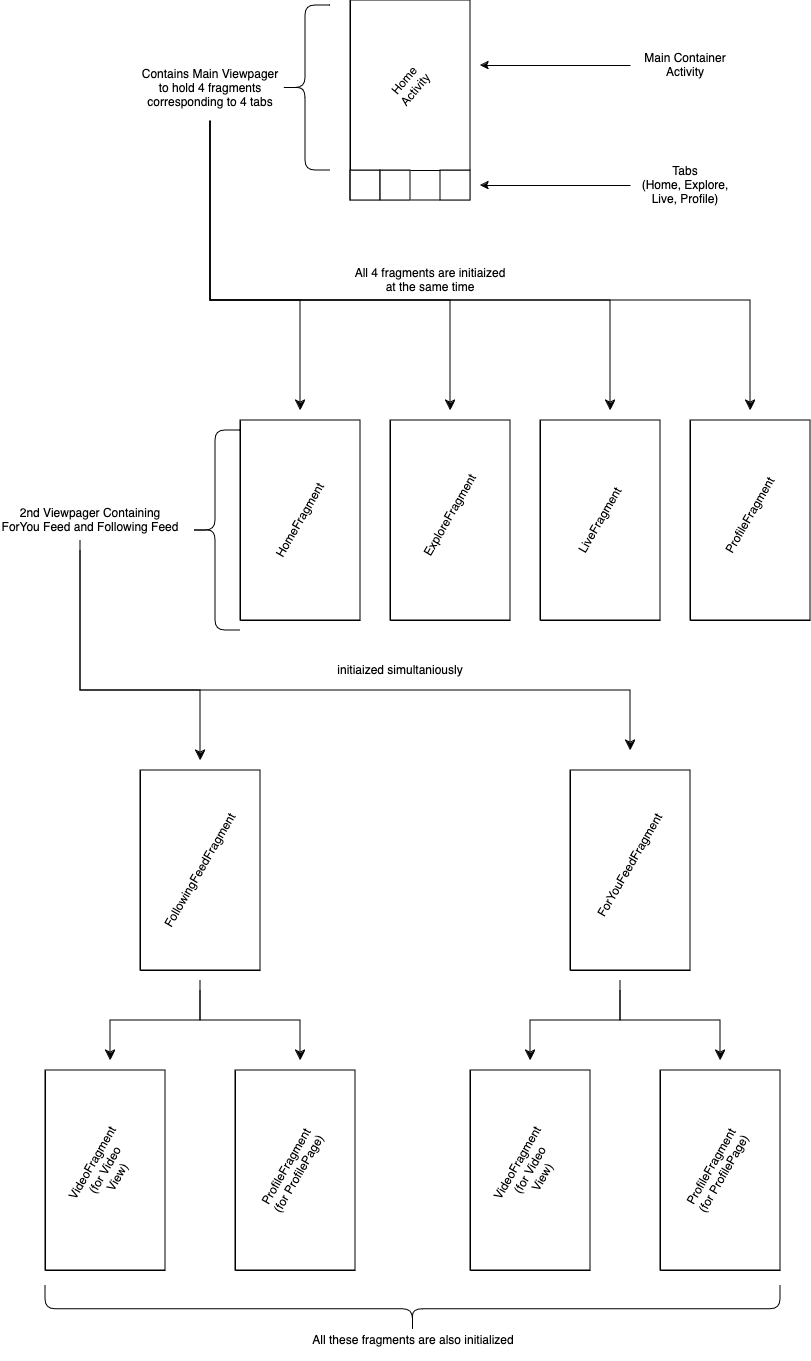
In the existing setup, the main view pager in HomeActivity hosts four top-level fragments: Home, Explore, Live, and Profile. All these fragments are initialized simultaneously to maintain their states, leading to the following structure:
- Home Fragment: Contains another view pager for the For You and Following fragments.
- For You and Following Fragments: Each has its own view pager to host the Video Player and Profile page, making them swipeable.
This results in three levels of nested view pagers and ten live fragments, significantly impacting performance due to the heavy initialization and state maintenance.
Proposed Setup: Simplifying Fragment Management
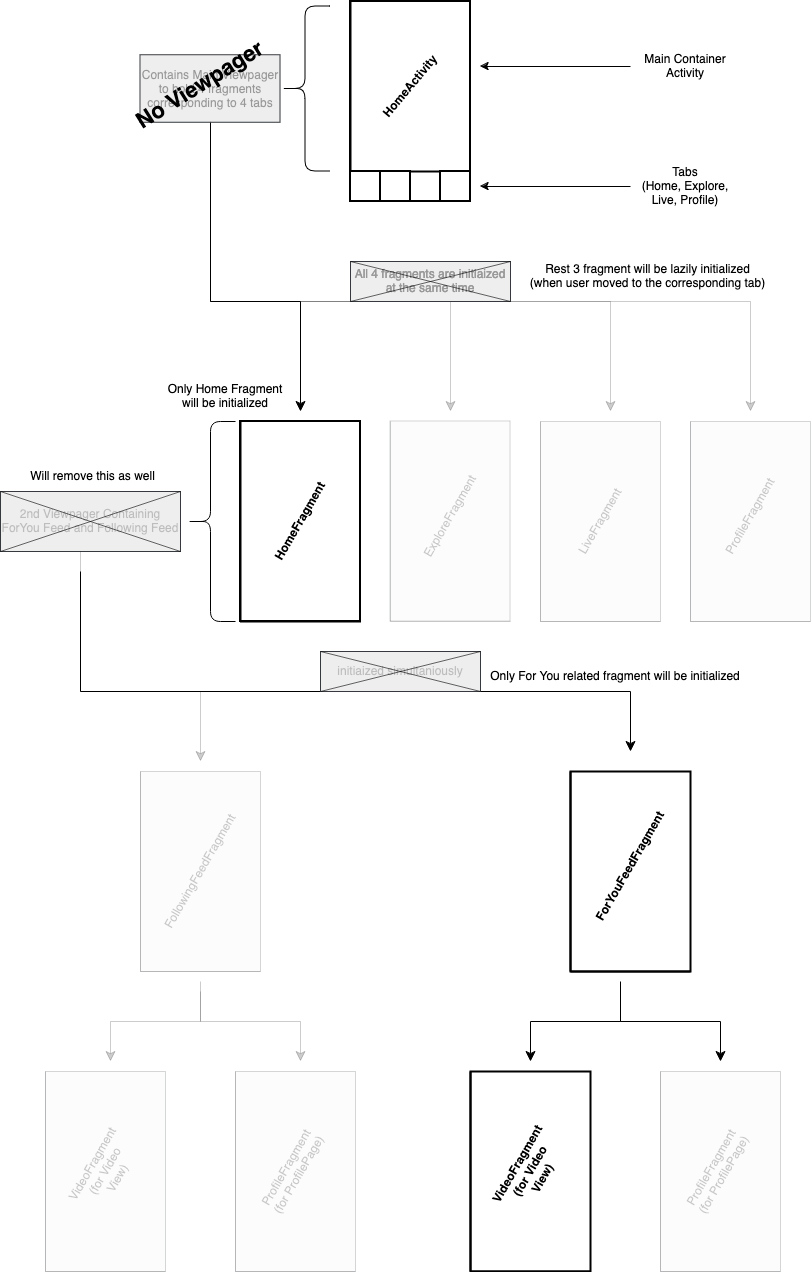
To address these performance issues, we propose a setup that reduces the complexity by lazy loading fragments only when needed. Here’s the detailed plan:
1. Removing the Main View Pager
- Action: Load only the Home Fragment initially.
- Benefit: Reduces the number of simultaneously initialized fragments, easing memory and processing load.
2. Lazy Loading Top-Level Fragments
- Action: Load the remaining top-level fragments (Explore, Live, Profile) only when the user navigates to the corresponding tab.
- Benefit: Improves app startup time and reduces memory consumption by initializing fragments on demand.
3. Streamlining the Home Fragment
- Action: Remove the second view pager within the Home Fragment. Load only the For You fragment initially, and load the Following feed only when the user taps on the Following tab.
- Benefit: Reduces the complexity and number of live fragments, enhancing performance.
4. Optimizing the Profile Fragment
For the third view pager related to the profile swipe option, we propose two approaches:
- Option 1: Remove the view pager entirely, requiring users to tap on the profile icon or username to navigate to the profile page.
- Option 2: Retain the view pager but use a dummy empty fragment. Lazy load the profile fragment only when the user navigates to the profile page, similar to Instagram’s approach.
- Benefit: Both options reduce nested view pager complexity and the number of live fragments, resulting in significant performance gains.
Implementation Steps
- Update the Main Activity: Modify HomeActivity to remove the main view pager and initialize only the Home Fragment.
- Implement Lazy Loading: Adjust the fragment transaction logic to load fragments on tab selection.
Optimize Fragment Transactions: Ensure smooth transitions and state handling when fragments are loaded or replaced.
Benefits of the New Setup
- Performance Improvement: Reducing the number of live fragments and nested view pagers decreases memory usage and enhances rendering speed.
- User Experience: Faster app startup and smoother navigation create a more responsive and enjoyable user experience.
- Scalability: The simplified structure makes it easier to maintain and scale the app with new features.
Metrics
Here’s a look at the performance metrics for our Moj app, segmented by device ID.
Scaled Daily Active Users (DAU)
Our Scaled DAU shows an improvement, with an increase of 0.18% over the previous period. This represents a positive change in user engagement.
Day 1 Retention
Primary D1 Retention is holding steady with an increase of 0.11%, indicating a improvement in user retention from day one.
ANR (Application Not Responding) Rate
Our ANR rate has decreased significantly by 22.34%, reflecting a considerable improvement in app responsiveness.
User Time Spent
The average time spent by users has increased by 0.43%, indicating steady growth in user engagement.
Video Plays
The number of video plays has risen by 0.58%, representing an increase in user activity.
These metrics provide valuable insights into our app’s performance, helping us to continually improve the user experience.
Conclusion
Revamping the feed and fragment setup in our app by reducing nested view pagers and implementing lazy loading is a strategic move to boost performance. By following the proposed setup, we have significantly enhanced our app’s efficiency and provide a better user experience. Regular monitoring and iterative improvements will ensure sustained performance gains and user satisfaction. Stay tuned for more updates as we strive for excellence in our app.
Click here to learn more about our Engineering Team